Modern business applications need flexible interfaces that allow employees to access information, manage records, and complete daily operations efficiently. Salesforce provides different development technologies to help organizations customize their CRM applications according to specific business requirements. One important technology in this ecosystem is Lightning Web Components (LWC).
Salesforce Lightning Web Components is a modern programming model that allows developers to create interactive user interfaces using HTML, JavaScript, and CSS. It follows standard web development practices and supports the creation of reusable components that can work together within Salesforce applications.
Understanding this technology is useful for developers interested in modern CRM application development. Salesforce LWC Training introduces important concepts such as component architecture, JavaScript functionality, data integration, and application development, helping learners understand how customized Salesforce interfaces are created.
What Are Salesforce Lightning Web Components?
Lightning Web Components is a component-based programming model used to build customized user interfaces within the Salesforce platform. Instead of developing an entire application as one large structure, developers can divide its functionality into smaller components.
Each component performs a particular task. For example, a customer management application may contain separate components for displaying customer details, updating contact information, tracking opportunities, and managing service requests.
These components can be developed independently and combined to create a complete application interface.
The framework uses modern web technologies, making it easier for developers familiar with front-end development to understand its programming approach. It also provides access to Salesforce platform services, allowing components to interact with CRM records and business information.
Why Does Salesforce Use Component-Based Development?
Business applications frequently require changes as organizations introduce new workflows, services, and operational requirements. Modifying a complete application whenever a small feature changes can make development difficult.
Component-based development addresses this challenge by dividing application functionality into manageable units.
Some important benefits include:
- Code Reusability: Developers can reuse existing components across multiple application pages.
- Simplified Maintenance: Individual components can be updated without unnecessarily modifying other application sections.
- Flexible Development: Different components can be developed for specific business requirements.
- Consistent Interfaces: Reusable elements help maintain a consistent user experience.
- Better Organization: Separating functionality makes application structures easier to understand.
For example, a sales application may use the same customer information component on account pages and opportunity pages. Developers can maintain one reusable component instead of creating similar functionality repeatedly.
How Do Lightning Web Components Work?
LWC works through a combination of component files, JavaScript functionality, user interactions, and Salesforce platform services.
When a Salesforce page loads, the framework initializes the required components and displays their user interfaces. JavaScript controls their behavior, while Salesforce services provide access to the required business information.
The working process generally includes the following stages:
1. Component Initialization: When a component is loaded, Salesforce creates its instance and executes its initialization logic. Developers can use lifecycle hooks such as constructor() and connectedCallback() to prepare component data, set initial values, and perform setup activities.
2. Interface Rendering: The HTML template defines the visual structure of the component, including buttons, forms, input fields, tables, and other interface elements. Salesforce uses the component's JavaScript properties to display dynamic information in the template.
3. User Interaction: Users interact with the component through actions such as clicking buttons, entering information, selecting options, or submitting forms. Event handlers help capture these interactions and trigger the appropriate functionality.
4. JavaScript Execution: JavaScript controls the component's behaviour and business logic. Developers write methods to validate user input, process information, manage component properties, and respond to different user actions.
5. Data Communication: Components can retrieve and update Salesforce records using Lightning Data Service, UI API wire adapters, or Apex methods. The appropriate approach depends on the complexity of the data operation and the application's requirements.
6. Component Communication: Different components can exchange information when building larger applications. Parent components can pass data to child components through public properties, while child components can communicate with parents using custom events. Lightning Message Service can support communication between unrelated components.
7. Interface Updates: When reactive component properties change, Salesforce updates the relevant parts of the user interface. This allows developers to display updated record information, validation messages, notifications, and other dynamic content without manually rebuilding the entire interface.
For example, when a sales representative opens an opportunity record, a component can display its name, expected revenue, closing date, and current sales stage. If the representative updates the stage, the application can process the change and reflect the updated information.
This combination of interface rendering, application logic, and data communication explains how Lightning Web Components in Salesforce support customized CRM experiences.
What Is the Architecture of LWC?
The architecture of LWC follows a structured approach in which different files work together to define component functionality.
A standard component bundle generally contains four main files.
HTML File
The HTML file defines the structure and visible content of a component. Developers use HTML templates to create headings, buttons, input fields, forms, tables, and other interface elements. For example, a customer profile component may display a customer's name, email address, account details, and contact information.
JavaScript File
The JavaScript file manages the component's functionality. It contains properties, methods, event handlers, and data-processing logic. When users click a button or enter information into a form, JavaScript determines how the component should respond.
CSS File
The CSS file controls the visual appearance of a component. Developers use styling rules to manage spacing, alignment, typography, colors, and layouts.
It helps maintain a consistent design while allowing individual components to have their own styling requirements.
XML Configuration File
The XML configuration file contains component metadata. It defines information such as the API version and supported Salesforce environments or Lightning page types where the component can be used.
Together, these files form the basic structure of an LWC component. Understanding this structure is an essential part of Salesforce LWC Development because it helps developers organize functionality and maintain application code.
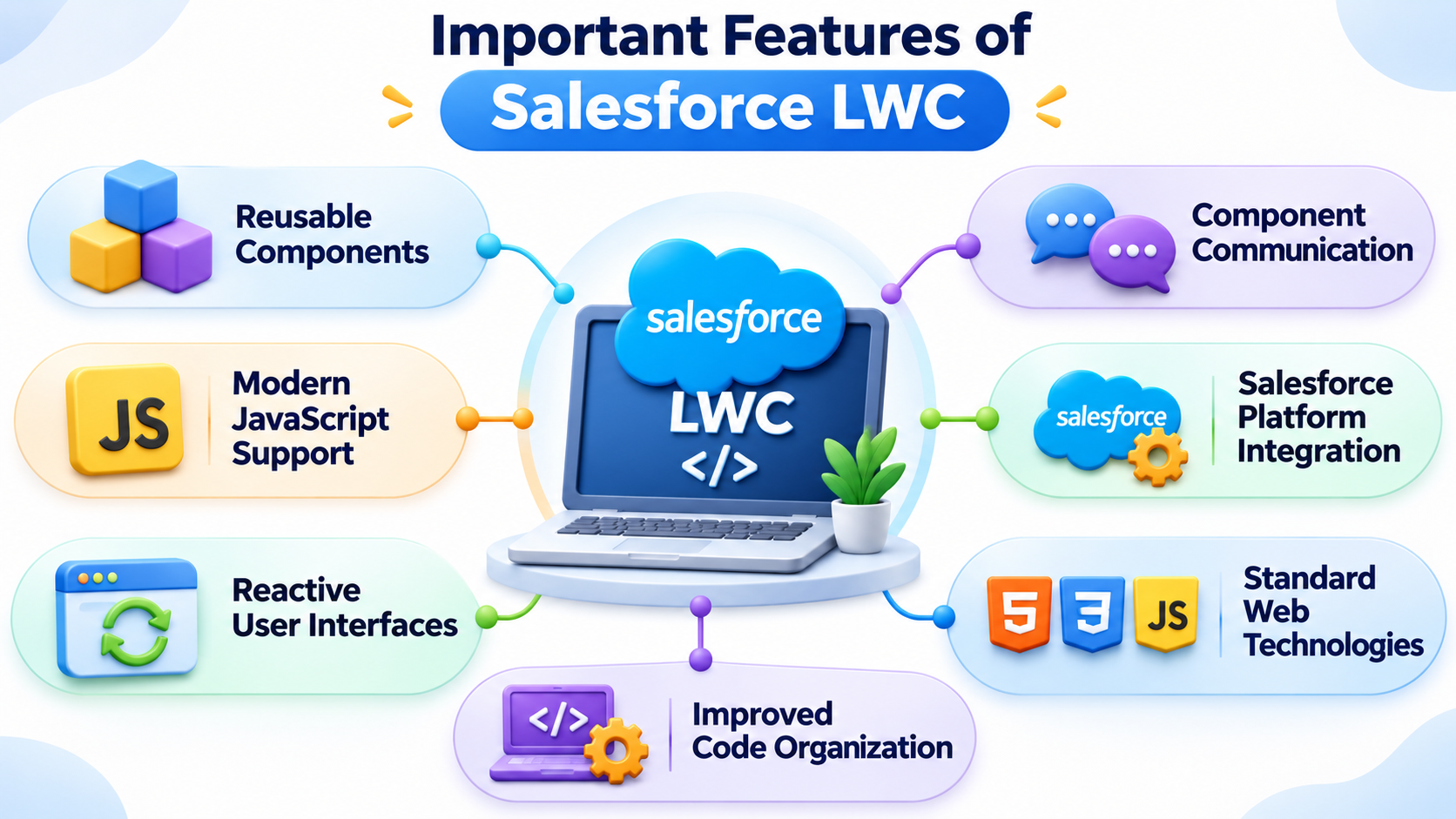
What Are the Important Features of Salesforce LWC?
Salesforce Lightning Web Components offers several features that help developers build modern, interactive, and maintainable user interfaces. It combines standard web technologies with Salesforce platform capabilities, making it suitable for developing customized business applications.
1. Reusable Components
LWC follows a component-based architecture, where developers can create independent interface elements for specific functions. These components can be reused across different pages and applications, reducing duplicate code and making future updates easier.
2. Modern JavaScript Support
LWC uses modern JavaScript features and standard browser capabilities. Developers can work with JavaScript functions, classes, modules, and event handling to build interactive interfaces while applying familiar front-end development concepts.
3. Reactive User Interfaces
The framework supports reactive properties that help keep the interface synchronized with component data. When relevant values change, the displayed content can update automatically. This is useful for dynamic forms, record details, search results, and interactive dashboards.
4. Component Communication
LWC provides different ways for components to exchange information. Parent components can pass data to child components through public properties, while child components can send information through custom events. Lightning Message Service also supports communication between components that do not share a direct parent-child relationship.
5. Salesforce Platform Integration
LWC integrates with Salesforce platform services, including Lightning Data Service, UI API, and Apex. Developers can use these options to retrieve records, display information, perform data operations, and connect interface elements with business logic.
6. Standard Web Technologies
The framework is built around HTML, CSS, and JavaScript. It uses web standards and browser capabilities, allowing developers to create structured layouts, apply styling, and manage application behaviour without depending entirely on a proprietary front-end language.
7. Improved Code Organization
Each LWC component maintains its own structure and functionality through separate files for its template, JavaScript logic, styling, and metadata. This separation makes code easier to understand, test, maintain, and manage as applications become more complex.
These features make LWC a useful framework for developing scalable Salesforce interfaces. They also help developers understand how modern front-end development concepts are applied within the Salesforce ecosystem.
What Are the Core Concepts Used in LWC Development?
Understanding the technical building blocks is important for developing components that work correctly and can be maintained over time.
Decorators provide additional information about properties and methods within a component.
Three commonly used decorators include:
@api: Makes properties or methods publicly accessible to other components.
@track: Enables tracking of certain internal object and array changes.
@wire: Connects a component to Salesforce data or supported services through a reactive mechanism.
These decorators help developers manage component properties and data access.
Lifecycle hooks are methods that execute at different stages of a component's existence.
Important lifecycle hooks include:
- constructor()
- connectedCallback()
- renderedCallback()
- disconnectedCallback()
For example, connectedCallback() executes when a component is inserted into the DOM. It can be used for initialization activities that do not depend on completed rendering.
Understanding LWC Lifecycle Hooks helps developers manage component initialization, rendering, and cleanup operations.
Event handling allows LWC components to respond to user actions such as button clicks, form submissions, input changes, and selections. Developers use event handlers to connect these actions with specific JavaScript methods and define how the component should respond.
For example, when a user clicks a button to submit a customer registration form, an event handler can capture the action, validate the entered information, and initiate the required operation. Similarly, input events can be used to monitor changes in form fields and provide feedback when information is entered incorrectly.
Conditional rendering controls which elements are displayed in a component based on specific conditions or changes in application data. Developers can use conditional directives such as lwc:if, lwc:elseif, and lwc:else to manage the visibility of different interface elements.
For example, a warning message can appear when a required field is missing, while a confirmation message can be displayed after a successful operation. Similarly, a component can show different content depending on a user's selection, record status, or available information. This approach helps create dynamic interfaces without displaying unnecessary elements to users.
Data binding connects JavaScript properties with elements displayed in an HTML template. It allows component data to be presented dynamically and helps keep the user interface updated when relevant property values change.
In LWC, developers commonly use template expressions to display JavaScript property values in HTML. For example, a customer name stored in a JavaScript property can be displayed directly in the component template. When the relevant property changes, the framework updates the displayed value.
Data binding is useful when developing forms, customer profiles, record summaries, and interactive dashboards. It helps developers manage information between the component's JavaScript logic and its visual presentation in a structured way.
How Do LWC Components Communicate With Each Other?
A complex Salesforce application generally contains multiple components that need to exchange information.
For example, a customer management interface may include a parent component displaying customer details and child components showing account information and related opportunities.
LWC supports different communication methods depending on the component relationship.
Parent-to-Child Communication
A parent component can pass information to a child component through public properties declared using the @api decorator. This allows the child component to receive values such as customer details, record IDs, or other information required to display specific content.
Child-to-Parent Communication
A child component can send information to its parent by dispatching custom events. For example, when a user selects a customer from a list, the child component can send the selected record's details to the parent, which can then update the displayed information.
Communication Between Unrelated Components
Some components do not have a direct parent-child relationship but still need to share information. In such situations, developers can use Lightning Message Service (LMS) to exchange messages between supported components across different parts of a Salesforce application.
Understanding these communication methods helps developers organize component interactions and build connected user interfaces. It is an important concept in Salesforce LWC Development, particularly when working with applications that contain multiple reusable components.
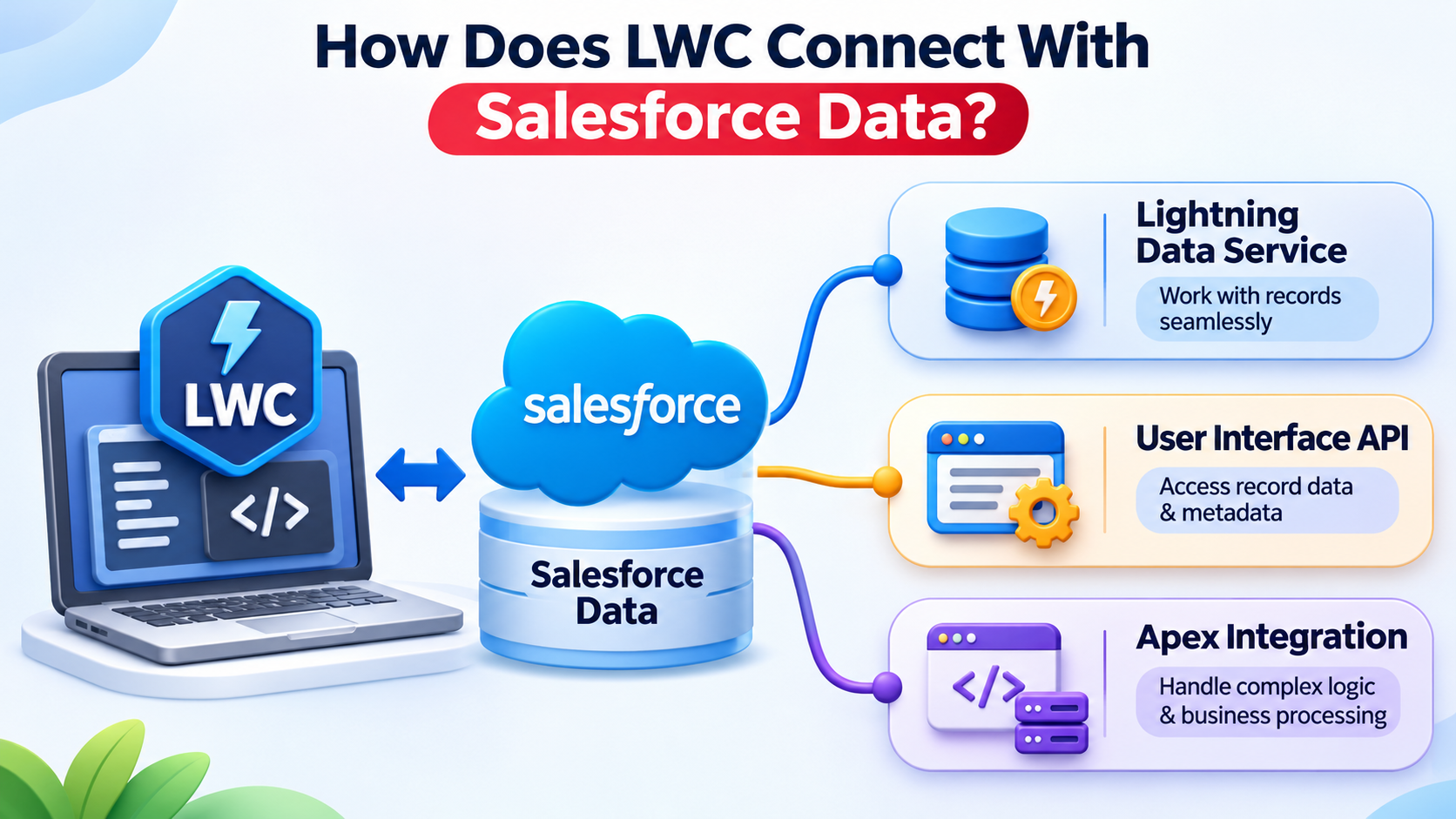
How Does LWC Connect With Salesforce Data?
An application interface becomes useful when it can retrieve and manage actual business information. Salesforce provides different methods for connecting components with its data platform.
Lightning Data Service
Lightning Data Service (LDS) allows developers to create, read, update, and work with Salesforce records without writing separate Apex code for every standard data operation. It also manages record data efficiently and helps keep information consistent across components. Developers can use wire adapters such as getRecord to retrieve record information.
User Interface API
Some application requirements involve complex business logic, multiple record operations, or customized server-side processing. Developers can use Apex methods exposed through @AuraEnabled to handle these requirements and call them from LWC using JavaScript.
Apex Integration
Some business requirements involve complex calculations, multiple record operations, or customized processing. In these situations, developers can call Apex methods from LWC. For example, a company may need to calculate a sales incentive using information from multiple records. Apex can perform the server-side processing and return the calculated result to the component.
Selecting the appropriate data access method helps developers manage application functionality and data operations more effectively.
Where Are Lightning Web Components Used in Real Business Applications?
The practical value of LWC becomes clearer when it is applied to common business requirements.
Customer Information Management
Businesses can develop components that display customer profiles, account details, contact information, communication history, and related activities in one organized interface. Employees can access relevant customer information without navigating through multiple pages. For example, a sales team can review a customer's previous interactions and account details before contacting them.
Sales Opportunity Management
Sales representatives can use customized components to review opportunity details, update sales stages, monitor expected revenue, and manage customer-related activities. Developers can also create visual summaries of sales pipelines and opportunity records. These interfaces help sales teams track progress, review important information, and manage their daily responsibilities more efficiently.
Customer Support Operations
Service teams can use LWC components to display customer history, support case information, case priority, and resolution status. A customized interface can help support representatives understand previous customer requests and review ongoing issues. Developers can also build components that allow employees to update case details, assign responsibilities, and manage service-related activities.
Custom Forms and Data Tables
Developers can build interactive forms to collect business information, validate user inputs, and create or update Salesforce records. Data tables can display multiple records in a structured format, allowing users to review information, search entries, and perform supported record actions. These features are useful for employee registration, customer requests, product records, and internal business applications.
Business Workflow Interfaces
LWC components can provide customized interfaces for approval requests, task management, employee activities, and other business processes. For example, an approval interface can display pending requests, relevant record details, and available actions. Employees can review information and complete assigned tasks through a structured interface.
These examples show how Salesforce Lightning Web Components can support different business requirements through reusable and interactive interfaces. The actual implementation depends on the organization's Salesforce configuration, data access requirements, and application design.
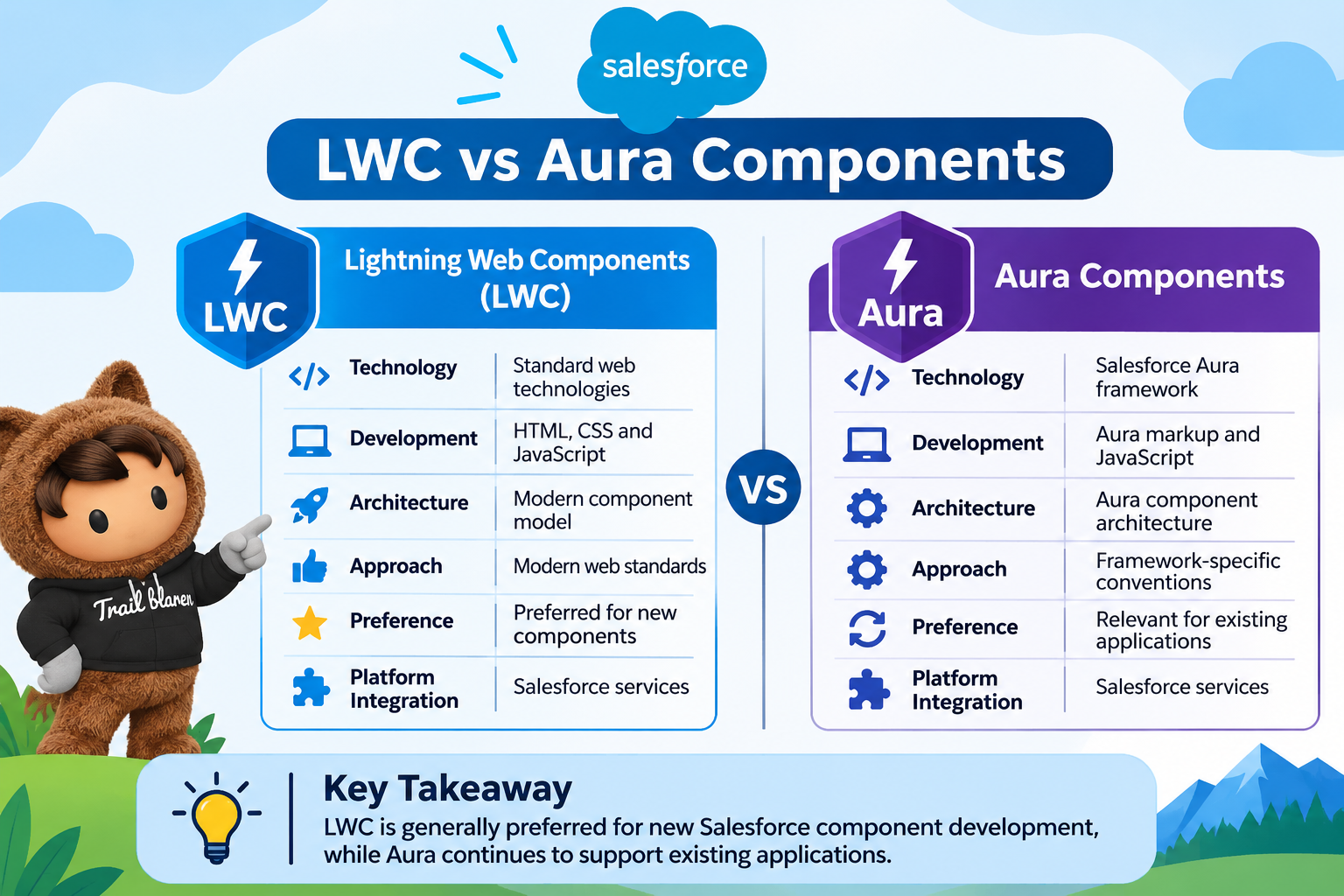
What Is the Difference Between LWC and Aura Components?
Salesforce introduced Aura Components before Lightning Web Components. Both frameworks are used to develop reusable and interactive user interfaces, but they differ in their architecture, programming approach, and use of web technologies.
Lightning Web Components (LWC) uses standard web technologies such as HTML, CSS, and modern JavaScript. It follows modern web standards and uses native browser capabilities to build customized Salesforce interfaces. Due to its modern development approach, LWC is generally preferred when creating new Salesforce components.
Aura Components, on the other hand, uses the Salesforce Aura framework and its own component programming model. It remains relevant for organizations that maintain existing Salesforce applications or depend on Aura-specific functionality.
Although both frameworks have different development approaches, they can coexist within supported Salesforce applications and communicate with each other through supported mechanisms.
What Challenges Do Developers Face When Working With LWC?
Although LWC uses familiar web technologies, developing reliable components requires an understanding of Salesforce-specific concepts and application requirements.
Some common challenges include:
Component Communication: Managing information exchange between multiple connected components can become difficult when application structures grow.
Data Management: Developers need to understand record access, data permissions, and appropriate methods for retrieving and updating information.
Performance Optimization: Unnecessary data requests and inefficient processing can affect application responsiveness.
Debugging: Errors may occur in JavaScript logic, component rendering, data operations, or configuration files.
Security Requirements: Developers must consider Salesforce access controls, sharing rules, and field-level security when designing data operations.
Understanding these challenges helps developers create applications that are more reliable, secure, and easier to maintain.
What Technical Skills Are Required for Salesforce LWC Development?
Developing components requires a combination of front-end programming and Salesforce platform knowledge.
Some important technical skills include:
- HTML: Understanding page structure, templates, and interface elements.
- CSS: Managing layouts, styling, and responsive design.
- JavaScript: Working with variables, functions, objects, events, and modern JavaScript concepts.
- Salesforce CRM: Understanding objects, fields, records, and relationships.
- Apex: Learning server-side programming and custom business logic.
- Development Tools: Using Visual Studio Code, Salesforce CLI, and Salesforce development extensions.
JavaScript is particularly important because it manages component behavior and user interactions. These technical areas form an important foundation for developing customized Salesforce applications.
How Can Beginners Practise LWC Development?
Understanding individual concepts is useful, but practical development experience helps learners see how different technologies work together.
Beginners can start with smaller assignments and gradually move towards more complex application requirements.
Some useful practice activities include:
- Create a component that displays customer information.
- Build a form that accepts user input and performs basic validation.
- Develop a component that retrieves Salesforce records.
- Create parent and child components that exchange information.
- Connect an LWC component with an Apex method.
- Build a small application that combines multiple components.
A structured Salesforce LWC Course can help learners understand these topics in a logical sequence, while practical exercises provide opportunities to apply the concepts.
What Should You Consider When Choosing Salesforce LWC Training?
Learning component development requires a balance of programming knowledge, Salesforce platform understanding, and practical implementation.
When evaluating Salesforce LWC Training, learners should consider more than the number of topics included in the curriculum.
Important factors include:
- Coverage of HTML, CSS, and JavaScript fundamentals.
- Explanation of component architecture and lifecycle methods.
- Practical use of Salesforce data services and Apex.
- Exercises involving component communication.
- Application-based development projects.
- Guidance on debugging and testing components.
Learners exploring Salesforce LWC Training in India can compare these factors to identify a learning program that matches their existing knowledge and development goals.
Salesforce documentation and Trailhead learning modules can also support independent learning through technical explanations and guided exercises.
Frequently Asked Questions
1. What is Salesforce Lightning Web Components used for?Lightning Web Components is used to develop reusable and interactive user interface elements within Salesforce applications. Developers can create customized forms, dashboards, record displays, data tables, and business workflow interfaces using standard web technologies.
2. Is Lightning Web Components based on JavaScript?
Yes. LWC uses modern JavaScript along with HTML and CSS. JavaScript manages component logic, user interactions, properties, events, and communication with Salesforce platform services.
3. Can LWC work with Salesforce records?
Yes. LWC can access and manage Salesforce records through Lightning Data Service, UI API, and Apex methods. The appropriate method depends on the application's data requirements and business logic.
4. What is the purpose of the @wire decorator?
The @wire decorator connects a component to a Salesforce data source or supported service. It provides a reactive mechanism for receiving information and managing data access within components.
5. Can developers create custom forms using LWC?
Yes. Developers can create customized forms using HTML templates, JavaScript, and Salesforce data services. These forms can collect information, validate inputs, and perform record operations according to application requirements.
6. What is the difference between LWC and Aura?
LWC follows modern web standards and uses native browser capabilities, while Aura is based on Salesforce's earlier component framework. LWC is generally preferred for new component development, whereas Aura remains relevant for existing implementations.
Conclusion
Lightning Web Components provides a modern approach to developing customized interfaces within Salesforce. Its reusable architecture, JavaScript support, and integration with Salesforce data services make it useful for applications involving customer management, sales operations, and service workflows.
Understanding component structure, lifecycle hooks, event handling, and data integration helps developers build a strong technical foundation. Consistent coding practice and working on practical application scenarios can further improve their ability to develop and maintain Salesforce components.
Learning these concepts through documentation, hands-on exercises, and structured technical guidance can help aspiring developers understand component-based development within the Salesforce ecosystem. A structured
Salesforce LWC Course can also help learners strengthen their practical knowledge, work with real-world development scenarios, and build the skills required to create and maintain Lightning Web Components.








 +91-8882178896
 +1 (343) 477-0926