

Step by step guide to starting a career in software testing
Table of Contents
Software testing training is designed to equip individuals with the skills required to ensure software quality, functionality, and reliability before applications are released to users. It covers core testing concepts such as manual testing, automation basics, test case design, defect tracking, and real-time project scenarios. With the rapid growth of digital products, software testing has become a high-demand career option that offers strong job stability and growth opportunities. One of the biggest advantages of software testing training is that it does not require deep programming knowledge to get started, making it accessible to a wide range of learners.
Who Can Do Software Testing Training?
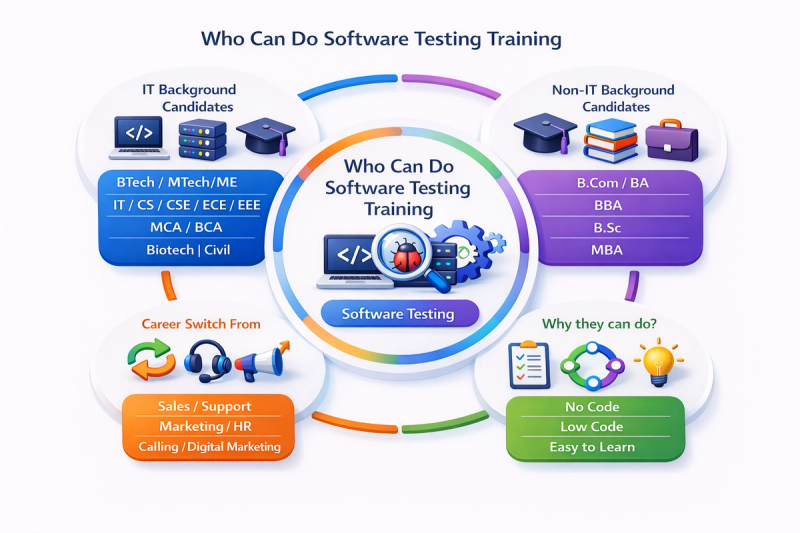
Software testing is an inclusive career path suitable for candidates from both IT and Non-IT backgrounds, including those looking for no-code or low-code roles.
IT Background Candidates
- Graduates in Computer Science, IT, Engineering, or related fields
- Professionals working in development, support, or technical roles
- Candidates with basic knowledge of SDLC and software concepts
- Ideal for those looking to move into QA, automation, or DevOps testing roles
Non-IT Background Candidates
- Graduates from B.Com, BBA, BA, B.Sc, MBA, or other non-technical streams
- Career switchers looking to enter the IT industry
- Freshers with strong analytical and logical thinking skills
- No prior coding experience required for manual testing roles
No-Code & Low-Code Learners
- Manual testing is a no-code role, focusing on test cases, scenarios, and usability
- Automation testing can be learned with low-code tools and basic scripting knowledge
- Tools like Selenium, Playwright, and test management tools are beginner-friendly
- Ideal for individuals who want technical roles without heavy programming
Software testing training is suitable for anyone interested in quality assurance, problem-solving, and technology, regardless of their educational background. With structured training and hands-on practice, both IT and Non-IT candidates can successfully build a career in software testing.
Software Testing
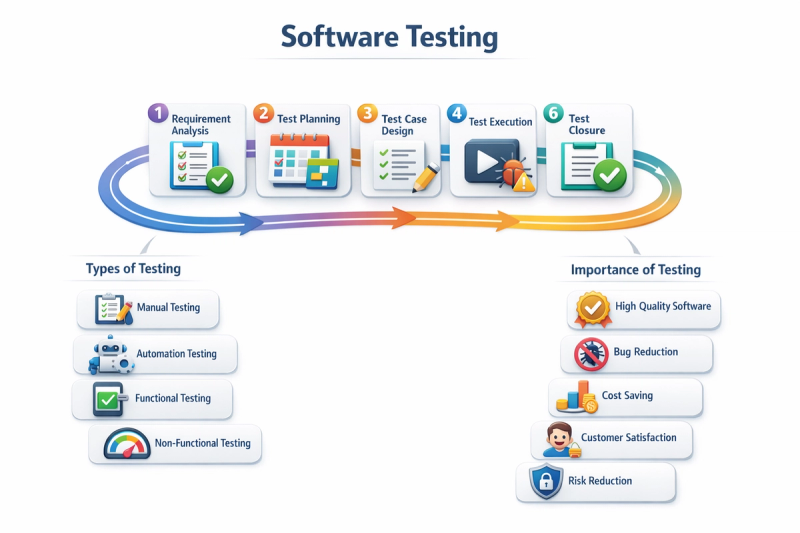
Software testing is a critical process used to evaluate software applications to ensure they function correctly, meet business requirements, and deliver a smooth user experience. It helps identify defects early in the development cycle, reducing risks and improving software quality. With the rapid growth of digital products, software testing has become essential for delivering reliable, secure, and high-performing applications. A strong understanding of testing fundamentals is especially important for beginners entering the QA and software testing domain.
Types of Software Testing
Software testing is broadly classified into different types based on testing objectives and execution methods. Each type plays a vital role in ensuring overall software quality.
- Manual Testing
Manual testing is performed by testers without using automation tools. Testers execute test cases, explore application features, and identify defects from a user’s perspective. It is ideal for usability testing, exploratory testing, and testing new features in the early stages of development. - Automation Testing
Automation testing uses scripts and tools such as Selenium, Cypress, or Playwright to execute test cases automatically. It is highly effective for repetitive tasks, regression testing, and large test suites. Automation improves test accuracy, saves time, and supports continuous integration and delivery pipelines.
Manual Testing
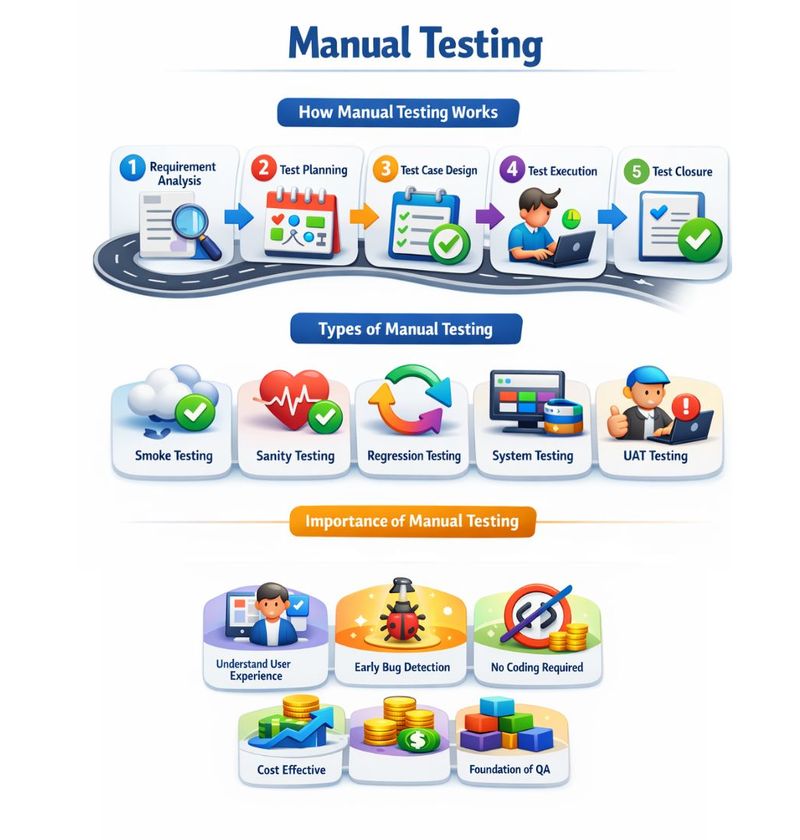
Manual Testing is one of the most essential and fundamental concepts in software testing. It refers to the process of testing software manually without using any automation tools. In manual testing, a tester executes test cases by hand, observes the application’s behavior, compares actual results with expected results, and identifies defects. This type of testing focuses heavily on human judgment, logic, and user experience, which makes it extremely important, especially for beginners entering the software testing field.
Manual testing plays a critical role in the software development life cycle because it helps ensure that the application meets business requirements and works as expected from a user’s perspective. Before any automation testing is performed, manual testing is always done first. In fact, every automated test case is originally designed as a manual test case.
For beginners, manual testing is the best starting point because it helps build strong testing fundamentals, improves analytical and logical thinking, and provides a clear understanding of how real users interact with software. It also helps testers learn how to identify defects, write test cases, and understand application workflows without the complexity of programming or automation tools.
Classification of Manual Testing
Manual Testing is the process of testing software manually without using automation tools to ensure that it works as expected. To understand manual testing in a structured way, it is broadly classified into two main categories based on how testing is performed and what aspect of the application is being tested. These classifications help beginners clearly understand the purpose and scope of each testing type.
Manual Testing is mainly classified into:
1.Based on Code Visibility
2.Based on Functionality
Based on Code Visibility:
Manual Testing based on code visibility focuses on how much knowledge a tester has about the internal structure of the application. This classification is also known as the Box Testing Approach because it refers to whether the tester can see inside the “box” (code) or not.
Based on code visibility, manual testing is divided into three main types:
1.White Box Testing
2.Black Box Testing
3.Grey Box Testing
Each of these testing types has a specific purpose and is used at different stages of software development.
1. White Box Testing (Structural Testing)
White Box Testing, also known as Structural Testing, is a testing technique in which the tester has complete knowledge of the internal code, logic, and structure of the application. In this approach, the tester examines how the software works internally by testing code paths, conditions, loops, and decision statements. Because the internal structure of the system is visible to the tester, it is referred to as “White Box” testing.
White box testing is usually performed by developers or testers who have strong programming knowledge. The main objective of this testing is to verify the correctness of internal logic, ensure maximum code coverage, identify hidden logical errors, and improve overall code quality and security.
- Unit Testing- Unit Testing is the first level of white box testing and focuses on testing individual units or components of the software. A unit can be a function, method, class, or module. In unit testing, each unit is tested independently to ensure it works correctly on its own. For example, in a login module, the username validation and password validation functions are tested separately. Unit testing is performed at an early stage of development, mainly by developers, and helps detect defects at the source, which reduces the cost and effort of fixing bugs later in the project.
- Integration Testing (White Box Perspective)- After unit testing, Integration Testing is performed to verify how different units or modules interact with each other. In white box integration testing, the tester checks the internal flow of data and function calls between integrated modules. For example, testing how the login module communicates with the database or how the payment module interacts with the order module. This type of testing is important because many defects occur when individually working components are combined together.
2. Black Box Testing (Behavioral Testing)-
Black Box Testing is a testing technique in which the tester does not have any knowledge of the internal code structure or implementation details. The tester focuses only on the inputs provided to the system and the outputs produced by the system. Since the internal workings of the application are hidden from the tester, this approach is called Black Box Testing.
Black box testing is commonly performed by manual testers, QA engineers, business analysts, and end users. The primary goal of this testing is to validate functional requirements, ensure the application behaves as expected, and identify missing or incorrect functionality from a user’s point of view.
- System Testing- System Testing is a type of black box testing where the complete and fully integrated application is tested as a whole. It verifies whether the system meets the specified functional and business requirements. During system testing, testers validate end-to-end workflows such as user registration, login, product search, checkout, payment processing, and order confirmation. This testing is performed in a test environment after integration testing and ensures that the entire system functions correctly under real-world scenarios.
- User Acceptance Testing (UAT)- User Acceptance Testing, commonly known as UAT, is the final phase of testing before the software is released into production. It is performed by clients, business users, or end users to confirm that the system meets their business needs and expectations. The main purpose of UAT is to validate real-world business scenarios and ensure that the application is ready for live use. Only after successful UAT approval is the software deployed to the production environment.
3. Grey Box Testing
Grey Box Testing is a combination of both White Box and Black Box testing approaches. In this method, the tester has partial knowledge of the internal system, such as database structure, APIs, or high-level architecture, but performs testing from a user’s perspective.
Grey box testing helps testers design more effective test cases by using limited internal knowledge while still validating application behavior through the user interface. It is commonly used to identify data flow issues, security vulnerabilities, and integration-related defects.
Based on Functionality:
Manual Testing based on functionality focuses on what the application does and how well it performs.
Based on functionality, manual testing is further divided into
1. Functional Testing
2.Non-Functional Testing.
1.Functional Testing:
Functional Testing focuses on verifying that the software application works according to the defined functional requirements. The main goal of functional testing is to ensure that every feature of the application performs exactly as expected.
In functional testing, the tester:
- Provides input to the system
- Observes the output
- Compares the actual result with the expected result
Functional testing is primarily based on business requirements and user expectations, not on how the code is written.
- Unit Testing (Functional Perspective)- Unit Testing focuses on testing individual components or functions of an application to ensure they work correctly on their own. Each unit is tested independently before it is integrated with other modules. This testing helps identify defects early in the development process and ensures that each component behaves as expected.
- Integration Testing- Integration Testing verifies the interaction and data flow between different modules of an application. Even if individual units work correctly, issues can occur when they are combined. This testing ensures that modules communicate properly and data is passed accurately between components.
- System Testing- System Testing is performed on the complete and fully integrated application. It validates end-to-end business scenarios and ensures that the entire system meets functional requirements in an environment similar to production.
- Smoke Testing- Smoke Testing is a basic and quick check performed on a new build to ensure that critical functionalities are working. It confirms whether the build is stable enough for further testing. If smoke testing fails, the build is rejected.
- Sanity Testing- Sanity Testing is a focused testing activity performed after a minor change or bug fix. It verifies that the specific functionality works correctly and ensures that recent changes have not introduced major issues.
- Regression Testing- Regression Testing ensures that new changes or fixes have not affected existing functionalities. Testers re-run previously tested scenarios to confirm that the application still works as expected after modifications.
- User Acceptance Testing (UAT)- User Acceptance Testing (UAT) is the final testing phase, performed to verify whether the application meets business requirements and is ready for real users. Successful UAT approval is required before releasing the software into production.
- Alpha Testing- Alpha Testing is conducted by developers or internal testers at the developer’s site in a controlled environment. Its purpose is to identify major defects and stabilize the application before it is shared with external users.
- Beta Testing- Beta Testing is performed by real users in a real environment. It helps uncover issues that may not appear during internal testing. User feedback from beta testing is used to improve the product before its final release.
2. Non-Functional Testing:
Non-Functional Testing focuses on how well the application performs, rather than what it does. This type of testing validates quality attributes such as usability, compatibility, and localization.
- Usability Testing- Usability Testing checks how easy and user-friendly an application is. It focuses on navigation, clarity, and whether users can complete tasks without confusion.
- Compatibility Testing- Compatibility Testing verifies that the application works properly on different browsers, operating systems, devices, and screen sizes, ensuring a consistent user experience everywhere.
- Localization and Globalization Testing- Localization and Globalization Testing ensures the application works correctly for different languages, regions, and cultures, including date formats, currencies, time zones, and translations.
- Experience-Based Testing (Ad-Hoc Testing)- Experience-Based Testing depends on the tester’s skills, intuition, and experience instead of predefined test cases to find defects that structured testing may miss.
- Exploratory Testing- Exploratory Testing involves learning the application while testing it, without fixed scripts, helping testers quickly discover hidden issues and understand system behavior.
- Error Guessing- Error Guessing uses a tester’s past experience to predict where bugs are likely to occur, such as boundary conditions, invalid inputs, or previously problematic areas.
Importance of Manual Testing in a Testing Career
Manual testing is not outdated; it is the foundation of a successful software testing career. A strong understanding of manual testing helps beginners perform better in interviews, understand real-world projects, and smoothly transition into automation testing. Concepts such as test case design, defect reporting, and requirement analysis are all rooted in manual testing practices.
Automation Testing
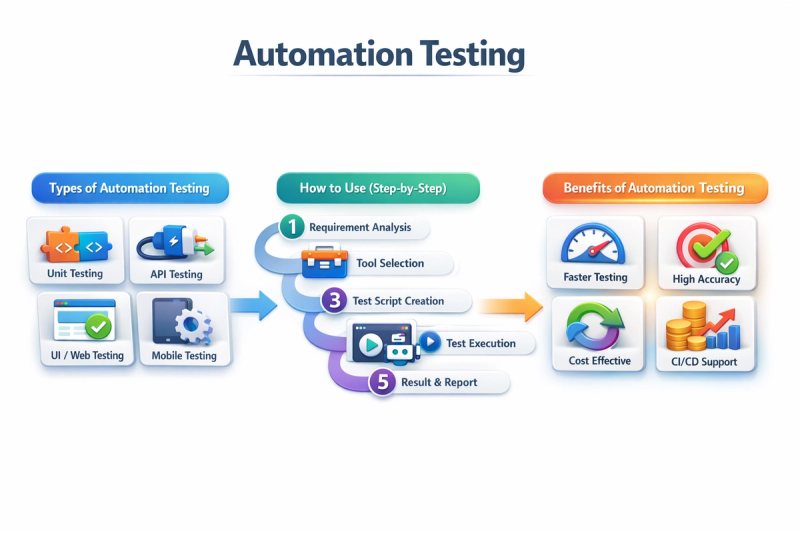
Automation Testing is a modern software testing approach in which test cases are executed automatically using tools, scripts, and frameworks instead of manual effort. It is widely used in today’s software industry to improve testing efficiency, accuracy, and speed, especially for large and complex applications.
Unlike manual testing, where testers execute test cases by hand, automation testing uses programming scripts and testing tools to validate application behavior. It is especially useful for repetitive tasks, regression testing, and performance validation.
Automation testing does not replace manual testing; instead, it complements manual testing. Strong manual testing knowledge is essential before learning automation.
Classification of Automation Testing
Automation Testing is generally classified into two major categories:
- Based on Test Type
- Based on Frameworks (Architecture)
Based on Test Type:
This classification focuses on what aspect of the application is being automated. It is divided into
1. Functional Automation
2. Non-Functional Automation.
1. Functional Automation Testing-
Functional Automation Testing verifies that the business logic and functionality of the application work as expected. It ensures that automated tests validate user actions, workflows, and system behavior.
- Unit Automation Testing
- API Automation Testing
- UI / Web Automation Testing
- Mobile Automation Testing
A. Unit Automation Testing:-
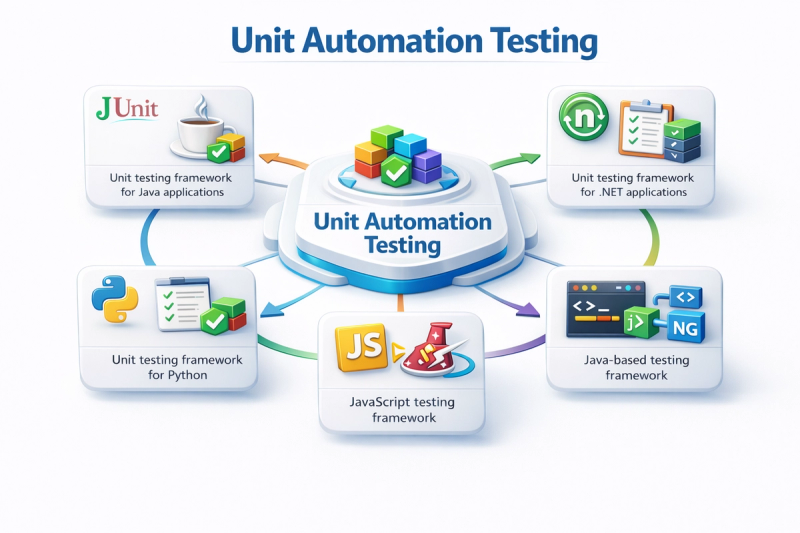
Unit Automation Testing is a type of software testing in which individual units or components of an application are tested automatically to ensure that they work as expected. In unit automation testing, test cases are written using automation tools or frameworks, and these tests are executed without manual intervention. The main goal is to verify the correctness of each unit independently, before integrating it with other parts of the application.
Unit Automation Tools-
1. JUnit- JUnit is a widely used unit testing framework for Java applications. It is one of the most popular tools for writing and executing automated unit tests in Java-based projects.
JUnit provides annotations that help define test methods and manage test execution easily. It is commonly used in combination with build tools like Maven or Gradle and integrates well with CI tools.
2. NUnit- NUnit is a unit testing framework for .NET applications, primarily used with C# programming. It is similar to JUnit but designed specifically for the .NET ecosystem.
NUnit allows testers and developers to write automated tests for individual units and execute them efficiently. It supports parameterized tests and provides detailed test reports.
3. PyTest- PyTest is a powerful and flexible unit testing framework for Python. It is known for its simple syntax and ability to handle both simple and complex test scenarios.
PyTest allows writing test cases with minimal code and provides advanced features like fixtures and plugins. It is highly popular in Python-based automation projects.
4. Jest- Jest is a JavaScript testing framework primarily used for testing React, Angular, and Node.js applications. It is developed to provide a simple and fast testing experience for front-end and back-end JavaScript projects.
Jest comes with built-in test runners, assertion libraries, and mocking capabilities, making it easy to start unit testing without additional configuration.
5. TestNG- TestNG is a powerful Java-based testing framework inspired by JUnit but designed to handle more complex testing requirements. It is commonly used in enterprise-level automation testing.
TestNG supports advanced features like test grouping, prioritization, and parallel execution, making it suitable for large projects.
B. API Automation Testing:-
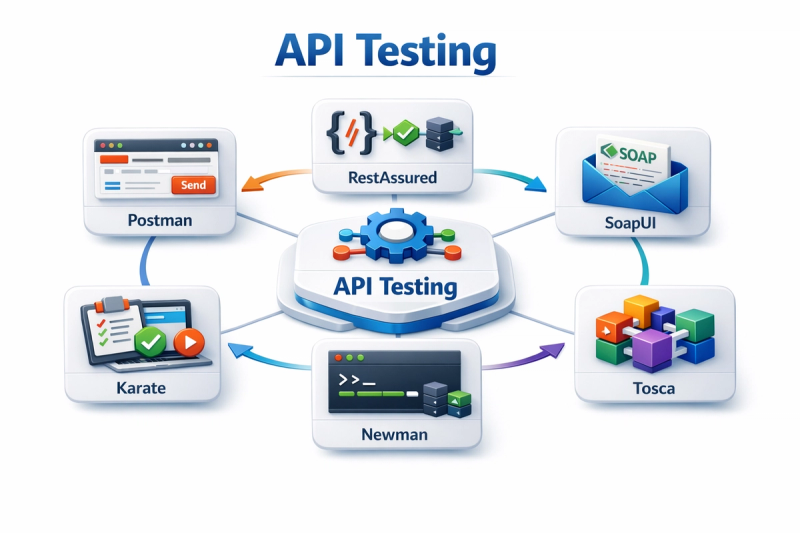
API Testing validates backend services and APIs without involving the user interface. It ensures that requests sent to the server return correct responses in terms of status codes, data, and performance.
Tools such as Postman and RestAssured are commonly used for API automation. API testing is faster, more stable, and highly reliable compared to UI testing.
API Automation Tools-
1. API Postman
2. API RestAssured
3. SoapUI
4. Karate
5. Newman
6. Tosca
1. API Postman- is a popular tool that is especially beginner-friendly. It provides an easy-to-use interface for sending API requests such as GET, POST, PUT, and DELETE. Testers can validate response status codes, response time, headers, and data using built-in test scripts written in JavaScript. Postman also allows automation through collections and can be easily integrated with CI/CD tools, making it suitable for both manual and automated API testing.
2. API RestAssured- is a Java-based library mainly used by automation testers and developers. It is used to automate REST API testing by writing test scripts in Java. RestAssured supports request validation, response verification, authentication handling, and data-driven testing. Because it integrates well with frameworks like TestNG and JUnit, it is commonly used in enterprise-level automation projects.
3. SoapUI- SoapUI is a powerful tool used for testing SOAP and REST APIs. It supports both functional and non-functional testing, including security and performance testing. SoapUI allows testers to create automated test cases using a graphical interface and scripting capabilities.
4. Karate- Karate is an open-source API testing framework that combines API testing, automation, and performance testing into a single platform. It uses a simple, readable syntax that does not require deep programming knowledge. Karate is especially popular among testers who want to perform API automation without writing complex code.
5. Newman-Newman is the command-line collection runner for Postman. It allows Postman collections to be executed from the terminal or integrated into CI/CD pipelines. Newman makes it easy to automate API test execution as part of build and deployment processes.
6. Tosca- Tosca is a commercial, enterprise-level test automation tool designed to automate web, mobile, API, desktop, and enterprise applications using a model-based, scriptless approach. It is widely used in large organizations where automation needs to be scalable, maintainable, and easy to manage across complex systems.
Unlike traditional automation tools that require heavy coding, Tosca allows testers to create automation tests using drag-and-drop components, making it suitable for both technical and non-technical testers. This scriptless approach significantly reduces test development and maintenance effort.
C. UI / Web Automation Testing:-
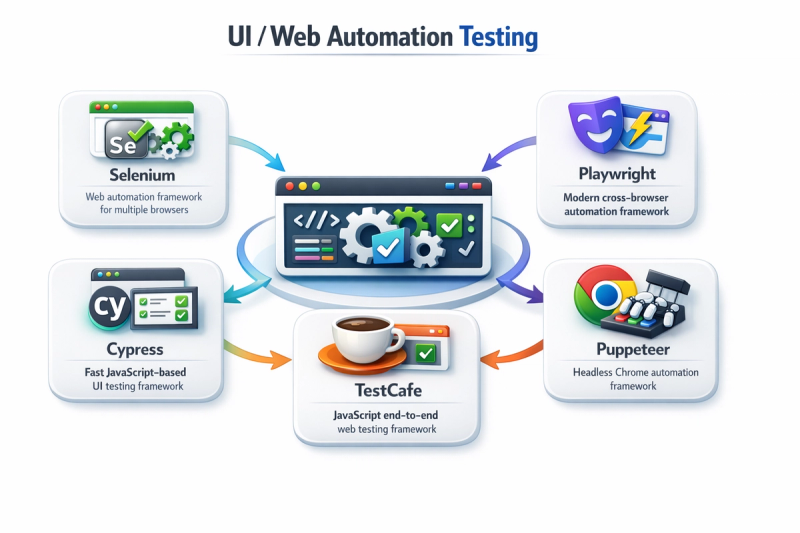
UI or Web Automation Testing focuses on validating the user interface and browser interactions. It simulates user actions such as clicking buttons, filling forms, and navigating pages.
Popular tools like Selenium and Playwright are used for web automation. This type of testing ensures that the application behaves correctly from an end-user perspective.
1. Selenium
2. Playwright
3. Cypress
4. TestCafe
5. Puppeteer
1. Selenium- Selenium is the most widely used open-source UI automation testing framework for web applications. It is designed to automate real user interactions with web browsers, making it highly reliable for validating end-to-end user flows. Selenium supports multiple programming languages such as Java, Python, C#, and JavaScript, which gives teams flexibility to choose a language based on their expertise.
Selenium works by interacting directly with web elements like buttons, input fields, and links, just as a real user would. Because it automates actual browsers, it is suitable for cross-browser testing, including Chrome, Firefox, Edge, and Safari. Selenium is commonly used in enterprise automation frameworks and integrates well with testing frameworks like TestNG and JUnit, as well as CI/CD tools such as Jenkins.
2. Playwright- Playwright is a powerful cross-browser UI automation framework designed to test modern web applications. It supports Chromium, Firefox, and WebKit, making it highly effective for cross-browser compatibility testing. Playwright allows testers to automate complex UI scenarios that involve multiple tabs, windows, or browser contexts.
One of Playwright’s biggest advantages is its auto-waiting capability, which ensures that elements are ready before interactions are performed. It supports multiple programming languages such as JavaScript, TypeScript, Python, Java, and C#. Playwright is gaining popularity for its speed, reliability, and modern design.
3. Cypress- Cypress is a modern JavaScript-based UI automation testing tool created specifically for web applications. Unlike Selenium, Cypress runs directly inside the browser, which allows it to interact with web elements faster and more reliably. This architecture reduces test flakiness and makes debugging easier.
Cypress is mainly used by front-end developers and testers working with modern JavaScript frameworks such as React, Angular, and Vue. It automatically waits for elements to load, which removes the need for explicit waits in most cases. Cypress also provides real-time test execution, allowing users to see test steps as they run.
4. TestCafe- TestCafe is a Node.js-based UI automation testing tool that simplifies web testing by removing the need for WebDriver or browser plugins. It uses a built-in automation engine that makes test execution more stable and easier to manage.
TestCafe provides a clean and readable syntax, making it beginner-friendly. It automatically handles waits and synchronization, which reduces flaky tests. TestCafe can run tests on multiple browsers simultaneously and supports testing on remote devices as well.
5. Puppeteer- Puppeteer is a Node.js library developed to automate Chrome and Chromium browsers. It provides low-level control over browser actions, making it suitable for UI testing, web scraping, and performance monitoring. Puppeteer is commonly used in scenarios where Chrome-specific testing is required.
Puppeteer runs in headless mode by default, which makes it fast and suitable for CI/CD environments. It allows testers to capture screenshots, generate PDFs, and monitor performance metrics along with UI validation.
D. Mobile Automation Testing:-
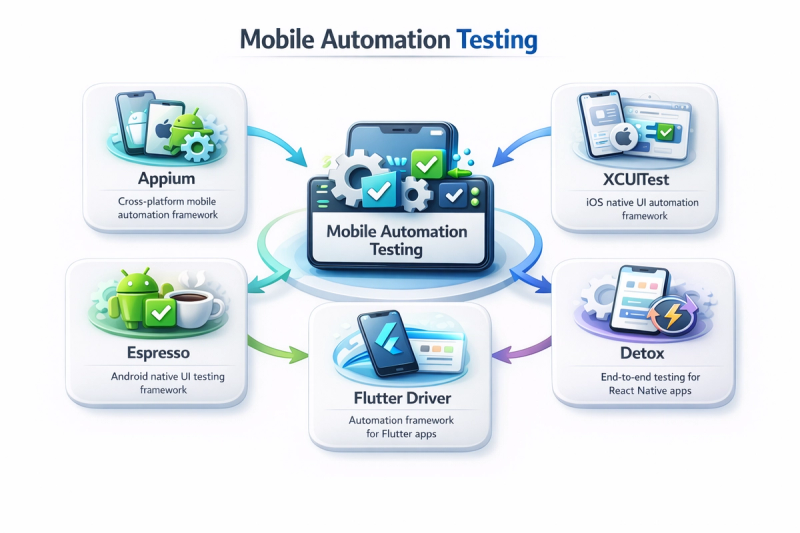
In mobile automation testing, test scripts simulate real user actions such as tapping buttons, entering text, scrolling screens, swiping, and navigating through the app. These tests ensure that the application behaves as expected on both Android and iOS platforms.
1. Appium
2. Espresso
3. XCUITest
4. Flutter Driver
5. Detox
1. APPIUM- Appium is the most popular open-source mobile automation testing framework used for testing Android and iOS applications. It supports native, hybrid, and mobile web applications and allows testers to write tests using programming languages such as Java, Python, C#, and JavaScript.
Appium works by interacting with mobile apps in the same way a real user does, making it highly reliable. One of its biggest advantages is that it allows cross-platform testing, meaning the same test script can be reused for both Android and iOS with minimal changes.
2. ESPRESSO- Espresso is a native Android automation testing framework developed specifically for Android applications. It is mainly used by developers for writing fast and reliable UI tests.
Espresso runs inside the Android app and provides synchronized test execution, which makes tests stable and less flaky. It is best suited for testing Android apps where deep integration with the app is required.
3.XCUITest- XCUITest is the official UI automation framework for iOS applications, provided by Apple. It is used to automate UI tests for iPhones and iPads and works seamlessly with Xcode.
XCUITest is highly stable and optimized for iOS testing. It is generally preferred for iOS-native applications where Apple’s ecosystem and tools are used.
4. Flutter Driver- Flutter Driver is used for automating Flutter-based mobile applications. It allows testers to interact with Flutter widgets and validate app behavior.
Flutter Driver is mainly used when applications are developed using the Flutter framework and require widget-level validation.
5. Detox- Detox is an end-to-end mobile automation testing tool primarily used for React Native applications. It focuses on stability and synchronization, ensuring that tests run only when the app is idle.
Detox is known for its fast execution and reliability, making it suitable for modern mobile apps built with React Native.
2. Non-Functional Automation-
Non-Functional Automation Testing focuses on how well the application performs, rather than what it does. It validates quality attributes such as performance, security, and accessibility.
A. Performance Testing- Performance Testing checks how the application behaves under different load conditions. It ensures stability, responsiveness, and reliability.
- Load Testing evaluates system performance under normal user load.
- Stress Testing identifies the breaking point by applying extreme load.
- Volume Testing checks system behavior with large amounts of data.
- Endurance (Soak) Testing verifies application stability over a long duration.
Performance testing helps identify bottlenecks and scalability issues.
B. Security Testing- Security Testing ensures that the application is protected against vulnerabilities and attacks. Automation tools are often used for penetration testing, vulnerability scanning, and security validation.
Security automation helps detect risks such as unauthorized access, data leakage, and weak authentication mechanisms.
C. Accessibility Testing- Accessibility Testing verifies whether the application is usable by people with disabilities. It checks compliance with accessibility standards such as ADA and WCAG.
Automation tools help validate screen reader support, keyboard navigation, color contrast, and accessible labels, ensuring inclusivity for all users.
Based on Frameworks (Architecture)
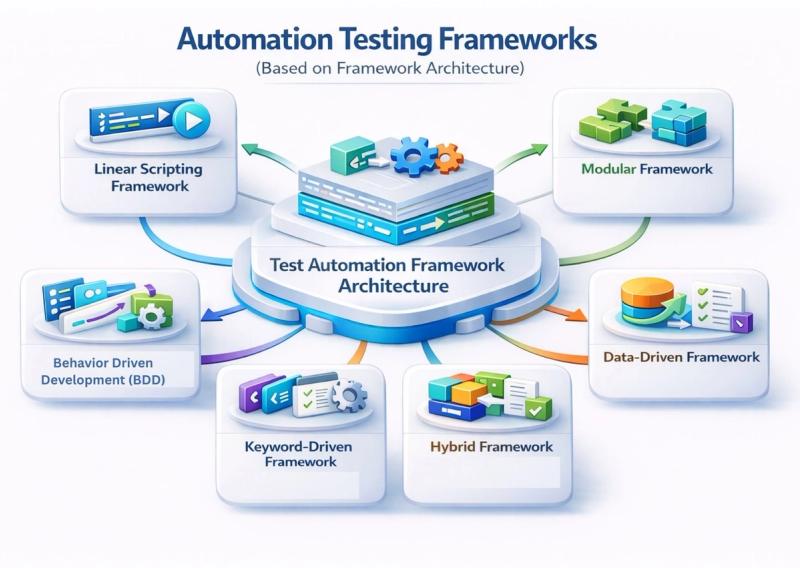
Framework-based classification focuses on how automation scripts are designed, structured, and maintained. A good framework improves reusability, scalability, and maintainability.
A. Linear Scripting Framework
B. Modular Framework
C. Data-Driven Framework
D. Keyword-Driven Framework
E. Hybrid Framework
F. BDD (Behavior Driven Development) Framework
A. Linear Scripting Framework:- Linear Scripting is the simplest form of automation testing, often based on record and playback. Test scripts are written sequentially without modularization.
While easy to implement, this framework is difficult to maintain and is not suitable for large projects.
B. Modular Framework:- The Modular Framework divides the application into small independent modules, and separate scripts are created for each module.
This approach improves reusability and maintenance, as changes in one module do not affect others.
C. Data-Driven Framework:- In the Data-Driven Framework, test logic and test data are separated. Test data is stored externally in files such as Excel, CSV, or databases.
This framework allows the same test script to run multiple times with different data sets, making it highly efficient and scalable.
D. Keyword-Driven Framework:- Keyword-Driven Framework uses predefined keywords to represent actions such as click, enter, or verify. Test cases are written using keywords rather than code.
This framework is beginner-friendly and allows non-technical users to design test cases.
E. Hybrid Framework:- Hybrid Framework is a combination of Data-Driven and Keyword-Driven frameworks. It takes advantage of both approaches, offering flexibility, reusability, and better test management.
Hybrid frameworks are commonly used in real-world automation projects.
F. BDD (Behavior Driven Development) Framework:- BDD focuses on collaboration between developers, testers, and business stakeholders. Test cases are written in plain English language using tools like Cucumber and Gherkin.
BDD scenarios follow a simple format:
Given-When-Then
This framework improves communication, clarity, and requirement understanding.
Importance of Automation Testing in a Testing Career
Automation Testing is a powerful approach that helps deliver high-quality software faster and more efficiently. Understanding automation testing types and frameworks is essential for anyone planning a career in software testing.
How TechPratham Bridges the Gap from Beginner to a Software Testing Expert
How TechPratham Bridges the Gap from Beginner to High-Earner Securing a 7-figure package in software testing isn't just about knowing the tools; it's about mastering the workflow. At TechPratham, we believe that the difference between an average salary and a premium package lies in mentorship. Our program is designed to simulate real-world enterprise environments, giving you hands-on experience with live projects that replace years of theoretical study. We guide you step-by-step through the complexities of the SDLC, from crafting precision test cases to executing complex automation scripts. By the time you graduate, you aren't just a fresher; you are a job-ready professional equipped with the specific, high-value skills that command top-tier salaries in the tech industry.
Job Market in Popular INDIA High tech cities
India's software testing market is growing rapidly in key IT hubs, creating strong opportunities for freshers and experienced testers. Cities like Bengaluru, Hyderabad, Pune, Chennai, Gurugram, and Noida lead in IT jobs with thousands of tech companies and a steady demand for QA skills.

Overall salary trend and scope
- Across India, freshers in software testing typically start around ₹3–5 LPA, with mid-level professionals reaching ₹6–10 LPA and beyond depending on automation and API skillsets.
- TechPratham’s specialized Software Testing, Automation, and API Testing programs are designed to match these market needs, combining live projects, recorded sessions, and placement-focused training for Noida, Hyderabad, and other IT cities.
Conclusion
Software testing continues to be one of the most reliable and future-proof career paths in the IT industry. With a strong foundation in manual testing fundamentals and a structured progression into automation, API, and modern testing frameworks, even beginners from non-technical backgrounds can build a successful and high-growth career. Over the past decade, industry demand has clearly shown that testers with solid fundamentals, real-world exposure, and practical skills consistently outperform those who rely only on tools. By mastering core concepts first and then upgrading to advanced automation skills, aspiring QA professionals can secure long-term career stability, competitive salaries, and opportunities across top IT hubs in India and globally.