
Top 50 Workday Integration Interview Questions of 2026 – Complete Guide for Professionals"
Table of Contents
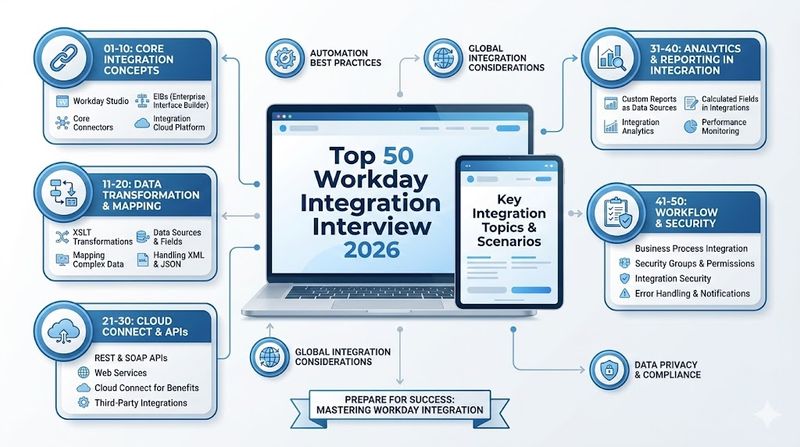
Workday Integration and Reporting play a critical role in ensuring seamless data flow and accurate insights across modern enterprises. Mastery of integrations, including Workday Studio, EIB, Cloud Connect, and Web Services, allows professionals to automate complex business processes and maintain data integrity. Additionally, advanced reporting skills, such as creating custom reports, calculated fields, and optimizing performance, are essential for informed decision-making. Understanding security, error handling, and monitoring ensures compliant and reliable operations. This comprehensive set of 50 interview questions covers fundamental, technical, and advanced aspects, providing a strong foundation for Workday finance and integration professionals to confidently prepare for interviews and showcase expertise.
Top 50 Workday Integration Interview Questions 2026
1. Define integration
Workday integration is the process of connecting Workday with external systems to exchange data seamlessly. It enables importing and exporting employee, payroll, finance, and reporting data efficiently. Integrations ensure data consistency, reduce manual effort, and improve operational workflows. They can be executed via Workday Studio, Enterprise Interface Builder (EIB), and Cloud Connect. Proper planning and understanding of business requirements are key to a successful integration.
2. What are the main types of Workday Integrations and how do you select which solution to use?
The main types include Workday Studio, EIB, and Cloud Connect. Studio handles complex integrations with custom logic, EIB is ideal for simple imports/exports, and Cloud Connect offers pre-built connectors for third-party applications. Selection depends on data volume, complexity, frequency, and integration requirements. Using the appropriate tool reduces errors and enhances performance. Understanding the use case ensures reliable and efficient data flow.
3. Name a prefix you can use to search for integrations.
The prefix “intsys:” is used in Workday to locate integration system users and definitions. It simplifies searching in large tenants with multiple integrations. This prefix is particularly useful for maintenance, monitoring, and troubleshooting. Consistent naming conventions help organize integrations and enhance clarity. Using it correctly ensures efficient identification of relevant integration objects.
4. Name some Integration ID types.
Integration ID types include Workday ID, External ID, and Reference ID. Workday ID uniquely identifies internal objects, External ID links Workday data to third-party systems, and Reference ID tracks mapping between datasets. Proper use ensures data integrity and traceability. These IDs are crucial during integration configuration, testing, and troubleshooting. Correct ID management reduces errors and maintains consistency across systems.
5. Name some input and output types for EIBs.
EIBs accept input from SFTP/FTP, REST API calls, and email attachments, while output can be delivered via SFTP/FTP, HTTP, email, CSV, JSON, or XML. These formats allow seamless interaction with external systems. Proper configuration ensures accurate data transfer and reduces processing errors. EIBs provide flexibility to handle diverse business scenarios. Understanding input/output types is key to building reliable integrations.
6. Describe the steps involved in creating an inbound EIB in Workday.
Creating an inbound EIB involves defining the integration, configuring the data source, mapping fields, transforming data, and testing the process. After validation, the EIB is scheduled to run automatically at set intervals. Error handling mechanisms ensure smooth data import. This structured approach guarantees accurate integration and minimal manual intervention. Thorough testing improves reliability and reduces potential data issues.
7. Explain the concept of a data source in Workday EIB.
A data source is the origin of data for extraction or import into Workday. It could be a Workday report, web service, or external file. The data source defines structure, fields, and content to be processed by the EIB. Accurate selection ensures proper data mapping and transformation. Effective data sources enable reliable integrations and consistent reporting across the organization.
8. How is data transformation managed in Workday EIB, and what are its benefits?
Data transformation in EIB uses mapping templates and rules to convert input data into the required Workday format. This ensures external data aligns with Workday standards. Benefits include accurate data integration, reduced manual effort, and improved reporting. Transformations handle currency, dates, and conditional logic. Properly configured transformations increase efficiency and prevent integration errors.
9. What is a Workday connector and how is it used?
A Workday connector is a pre-built integration template connecting Workday to external systems. It simplifies common integrations, such as payroll or benefits applications. Connectors reduce development time and ensure compatibility with system updates. They provide standardized interfaces, improving reliability. Using connectors accelerates deployment and enhances integration maintainability.
10. What are the advantages of using Workday Cloud Connect?
Workday Cloud Connect offers pre-built integration templates for third-party applications, reducing setup and maintenance time. It supports real-time and batch processing, improving operational efficiency. Cloud Connect ensures seamless data flow and consistent integration performance. Using these connectors reduces errors and minimizes customization. Organizations can focus on business operations rather than building custom integrations.
11. How can Workday integrations be scheduled?
Workday integrations are scheduled using the integration scheduler, which defines execution times and frequency. Integrations can run daily, weekly, monthly, or at custom intervals. Scheduling ensures timely data updates and reduces manual effort. Proper scheduling aligns with business processes and reporting cycles. Automated scheduling improves efficiency and reliability of integrations.
12. How does Workday handle large data volumes in integrations?
Workday manages large data volumes using batch processing, chunking, and optimized transfer protocols. These methods ensure fast, reliable data processing without performance degradation. Efficient data handling reduces system load and prevents errors. Workday tools like Studio and EIB support these techniques for scalability. Handling large volumes properly ensures accurate and timely data flow.
13. How does Workday ensure data integrity during integration processes?
Data integrity is maintained through validation rules, error handling, data transformation checks, and secure transmission. Workday ensures data accuracy at every step. Error notifications alert users to discrepancies, and automated corrections reduce mistakes. Proper mapping and testing further enhance integrity. Maintaining high data quality is essential for compliance and reliable reporting.
14. What Workday Studio component you can use to translate a conditional if or a loop?
The Route component in Workday Studio can be used to implement conditional logic or looping. It directs data through different paths based on rules. This allows flexible processing of complex integration scenarios. Combined with error handling, it ensures smooth and predictable workflows. Using the Route component improves integration control and reliability.
15. What good practice you should add to your integration to get notified of any errors in your Studio integration?
Using error handlers, such as send-error components, allows notifications of failures. Integration monitoring should include logging and email alerts. Alerts help promptly address issues and minimize business impact. Proper error handling ensures operational continuity. Following these practices improves reliability and reduces downtime.
II. Workday Studio & Technical (16–25)
16. Name some MVEL variables you can use in Workday Studio and what are they used for.
MVEL variables include lp for launch parameters, props for message properties, and vars for message context variables. They are used to access runtime data during integration execution. Proper use allows dynamic data manipulation within Studio. MVEL variables simplify integration logic and reduce hardcoding. Using them effectively improves flexibility and maintainability.
17. What is the name of the XML query language you can use to select elements from an XML?
XPath is used to query and select elements from XML documents. It enables precise data extraction for transformations and integrations. XPath supports complex queries with conditions and filters. This is essential in Workday Studio for handling XML payloads. Mastery of XPath ensures accurate and efficient integration processing.
18. Discuss the use of middleware in Workday integrations and its advantages and disadvantages.
Middleware acts as an intermediary between Workday and external systems, providing pre-built connectors, data transformation, and security features. Advantages include simplified integration, scalability, and centralized management. Disadvantages include cost, performance overhead, and additional maintenance. Middleware is beneficial for complex or multi-system environments. Careful evaluation ensures it aligns with integration strategy.
19. What are the key considerations for performance optimization in Workday integrations?
Performance optimization focuses on efficient data processing, minimizing payload sizes, using asynchronous processing, and proper scheduling. Transformation logic should be streamlined to reduce delays. Regular monitoring helps identify bottlenecks. Proper indexing and filtering improve extraction speed. Optimized integrations ensure timely and accurate data delivery.
20. Explain the process of developing a custom integration using Workday Studio and the challenges involved.
Developing a custom integration involves requirements gathering, workflow design, coding, testing, deployment, and monitoring. Challenges include handling complex logic, ensuring accurate transformations, managing errors, and maintaining security. Testing is critical to avoid production issues. Proper documentation improves maintainability. Skilled developers must balance flexibility with robustness.
21. What is a WSDL? Why is it important?
WSDL stands for Web Services Description Language, which defines how XML-based messages are formatted for web services. It ensures interoperability between Workday and external applications. WSDL specifies operations, endpoints, and data structures. Proper use ensures accurate data exchange and reduces errors. WSDL is essential for building robust and standards-compliant integrations.
22. What is the primary purpose of the Message Splitter component in Workday Studio, and when is it mandatory?
The Message Splitter breaks large payloads into smaller messages for processing. It is mandatory when handling multi-record transactions that exceed system limits. It ensures each record is processed individually, reducing failures. Combined with error handling, it improves reliability. This component is critical for high-volume integrations.
23. Explain the use case for the Custom Report Transformation step within an EIB.
Custom Report Transformation converts report data into a format suitable for external systems. It is used when Workday reports need reformatting, filtering, or mapping to integration fields. This ensures compatibility with receiving systems. Proper transformations prevent errors and data loss. It enables flexible reporting for multiple integration scenarios.
24. How does Workday manage Web Service endpoint versions (e.g., v31.2 vs. v33.0) and how does this impact integrations?
Workday maintains versioned endpoints to ensure backward compatibility while allowing new features. Choosing the correct version is critical for integration stability. Changes in newer versions may affect field names, data structures, or operations. Regular testing is required during upgrades. Managing versions properly prevents failures and ensures reliable integrations.
25. What is the difference between a Synchronous and an Asynchronous integration flow, and when would you choose one over the other?
Synchronous integrations process requests in real-time, returning immediate responses, suitable for time-sensitive transactions. Asynchronous integrations handle requests in batches, allowing delayed processing, ideal for large datasets or long-running tasks. Choice depends on data volume, performance, and business requirements. Asynchronous reduces system load. Synchronous ensures instant feedback.
26. Name two types of Workday Standard Reports and a difference between them.
Workday offers Report Writer Reports and XpressO Reports. Report Writer Reports can be copied and customized for specific needs, while XpressO Reports cannot be copied and are designed for standardized output. Report Writer Reports offer flexibility for custom reporting, including filters and calculated fields. XpressO Reports provide consistency and accuracy for critical operational reports. Understanding the differences helps in selecting the right reporting method for integration or analytics needs.
27. Which prefix limits a search to reports?
The prefix “rd:” is used to search for reports within Workday. It helps users quickly locate the desired reports in a large tenant. Using this prefix improves efficiency in reporting tasks. It ensures correct report identification for reporting, integrations, or RaaS access. Following proper naming conventions enhances clarity and reduces errors in report selection.
28. What is the relationship between a Business Object and a Data Source? Give an example.
A Business Object serves as a template for an entity in Workday, while a Data Source defines the dataset to populate that object. For example, the Business Object “Employee” might use the Data Source “All Active Employees.” This relationship ensures accurate reporting and integration. Selecting the correct Data Source ensures relevant and secure data extraction. Proper mapping is critical for report accuracy and integration performance.
29. Which delivered report can provide the relationship between data source, business object and security groups that have access to those?
The “Data Source” delivered report provides this information. It displays how Business Objects, Data Sources, and security permissions interact. This report is essential for auditing and validating access control. Using it ensures compliance and proper data governance. It also helps integration developers verify data accessibility.
30. What are two ways to create a report in Workday?
Reports can be created by running the Create Custom Report task or by copying and modifying a Workday Standard Report. Creating from scratch allows complete flexibility in layout, filters, and calculations. Copying standard reports ensures consistency and accelerates development. Both methods support integration needs and ad-hoc reporting requirements.
31. What are some of the Report Types in the Workday Report Writer?
Report types include Simple, Advanced, Composite, Search, Matrix, and others. Simple Reports offer straightforward field selections, while Advanced Reports support related Business Objects and calculated fields. Composite Reports combine multiple data sources. Matrix Reports allow pivot-like data organization. Selecting the right type improves report performance and usability.
32. Name some types of Class Report Fields.
Class Report Fields include Currency, Boolean, Date, Numeric, Text, 1:1/1:M Object, and Self-referencing instance. These fields control how data is displayed and calculated in reports. Proper selection ensures accurate data representation. They are essential for building advanced, dynamic, and integration-ready reports. Mastering field types improves reporting and analytical capabilities.
33. If you share a report with everyone within your organization, will anyone be able to see the same output when running the report with the same input values? Why?
No, outputs depend on the user’s security access to the underlying Data Source. Workday enforces row-level and object-level security, filtering sensitive data. Sharing reports does not override these security settings. Each user sees only data they are authorized to view. Understanding security is crucial for accurate reporting and compliance.
34. What is a Calculated Field? How can you create one? What can you do with it?
A Calculated Field is a custom field that manipulates existing data to derive new information. It is created using the Create Calculated Field task. Calculated Fields can perform arithmetic operations, lookups, string formatting, and conditional logic. They enhance reports, integrations, and analytics. Properly using them improves efficiency and accuracy across Workday processes.
35. Name three Calculated Field Functions that are commonly used specifically within Workday Integrations.
Common functions include Lookup, Text Manipulation, and Currency Conversion. Lookup functions retrieve related data for mapping. Text Manipulation formats or parses strings. Currency Conversion ensures consistent financial data across multi-currency environments. These functions facilitate accurate integration and reporting. Using them reduces manual transformations and errors.
36. Explain the concept of "Optimizing a Report for Performance" and what report writing actions can slow a report down.
Optimizing reports involves reducing unnecessary data processing, using calculated fields efficiently, and minimizing related Business Objects. Actions like excessive joins, unfiltered queries, or nested calculations can slow performance. Indexed fields, proper filtering, and caching improve speed. Optimized reports run faster and reduce system load. Performance tuning ensures reliable integration and user experience.
37. What is the purpose of the "Sub-Filter" in an Advanced Report, and how is it different from the main report filter?
A Sub-Filter applies additional conditions to specific sections of the report. It does not affect the main dataset but refines displayed results. Main filters limit the overall data scope. Sub-Filters allow targeted data analysis without modifying the base dataset. Using Sub-Filters enhances report flexibility and relevance.
38. How do you ensure the referential integrity of data displayed in a Matrix Report, given its structure?
Referential integrity is ensured by correctly linking row and column Business Objects. Proper configuration avoids mismatched or duplicated data. Validation of relationships and field mappings is essential. Maintaining integrity guarantees accurate summaries and totals. This is critical for reporting accuracy and informed business decisions.
39. What are Transposed Reports, and provide a business use case for them.
Transposed Reports pivot data rows into columns, providing a different perspective for analysis. They are useful for visualizing time-based metrics or departmental comparisons. For example, monthly sales per region can be displayed horizontally across columns. This improves readability and decision-making. Transposed reports enhance business insights and strategic planning.
IV. Advanced Concepts, Security & Monitoring (40–50)
40. Describe the architecture and components of Workday integration and their interaction.
Workday integration architecture includes Studio, EIB, Cloud Connect, and Web Services (WWS). Studio handles complex workflows, EIB supports simple imports/exports, and Cloud Connect provides pre-built connectors. WWS APIs enable real-time communication with external systems. These components interact to allow seamless data exchange. Understanding architecture ensures scalable, maintainable, and reliable integrations.
41. What are the common challenges faced during Workday integration testing, and how can they be addressed?
Common challenges include data mismatches, logic errors, security restrictions, and performance issues. These can be addressed through unit, integration, and end-to-end testing. Using realistic datasets and error logging helps identify issues early. Collaboration between functional and technical teams improves coverage. Thorough testing ensures accurate and reliable integrations.
42. Explain the role of Workday Report-as-a-Service (RaaS) in integrations.
RaaS allows Workday reports to be accessed as web services. External systems can request report data in structured formats like XML or JSON. It enables real-time data extraction and integration without building custom APIs. RaaS improves automation, reduces manual effort, and supports compliance reporting. This enhances seamless connectivity across platforms.
43. How does Workday manage data security in integrations, and what best practices should be followed?
Workday secures integrations using encryption, authentication, and access control. Integration System Users (ISUs) are used for controlled data access. Best practices include the least privilege principle, secure API usage, and audit logging. Monitoring and alerts detect suspicious activity. Following these measures ensures data integrity and regulatory compliance.
44. Explain the process and best practices for implementing robust error handling in Workday integrations.
Error handling involves capturing, logging, and notifying relevant users of issues. Using Studio error handlers or EIB notifications ensures prompt action. Automated retries, clear messages, and root cause analysis improve resolution. Testing error scenarios before production enhances reliability. Proper error handling maintains operational continuity.
45. What is the significance of the "Bounced" status for an integration, and what steps should be taken to resolve it?
A "Bounced" status indicates failed delivery or processing of integration data. Causes can include format issues, system errors, or connectivity failures. Resolving requires analyzing logs, correcting errors, and reprocessing the integration. Monitoring helps prevent recurrence. Understanding bounce handling ensures accurate and timely data transfer.
46. Describe how Security Groups interact with Integration System Users (ISUs) to grant access to integration data.
Security Groups define permissions for ISUs to access specific Workday data. Proper assignment ensures ISUs can perform integration tasks without exposing sensitive information. Groups can control view, edit, or execute privileges. Regular audits maintain compliance. Correct configuration protects data integrity while enabling integrations.
47. How can Workday Extend be leveraged to build an integration or add custom functionality that Studio or EIB cannot handle?
Workday Extend allows creating custom applications within Workday. It supports integrations or automation beyond Studio/EIB capabilities. Extend apps can interact with Workday data securely and in real-time. This provides flexibility for unique business scenarios. Leveraging Extend improves functionality and operational efficiency.
48. Explain the purpose of a Custom Validation step in an integration.
Custom Validation ensures data meets business rules before processing. It checks for format, completeness, or logical errors. Validation prevents incorrect data from entering Workday or external systems. Alerts notify users of violations for correction. Using validations enhances data quality and integration reliability.
49. What is Workday Prism Analytics, and how does Workday integrate data from external systems into it?
Workday Prism Analytics allows combining Workday and non-Workday data for advanced insights. Data from external sources can be ingested, transformed, and analyzed alongside Workday datasets. This integration supports decision-making, reporting, and forecasting. Prism provides visualization tools and dashboards. Proper integration ensures data accuracy and strategic value.
50. What is the difference between the Integration Audit Log and the Integration Gateway Log?
The Integration Audit Log tracks all integration execution activities, including success, failure, and user interactions. The Integration Gateway Log captures low-level technical details like API calls, payloads, and transmission errors. Audit Logs are for functional monitoring and compliance, while Gateway Logs assist troubleshooting technical issues. Using both ensures full visibility and effective issue resolution.
Conclusion:
By thoroughly understanding these 50 Workday Integration and Reporting questions, candidates can demonstrate both technical proficiency and practical knowledge required for real-world business scenarios. The questions cover everything from foundational concepts to advanced techniques, security considerations, and error handling best practices. Mastering these areas equips professionals to design, implement, and manage seamless integrations and robust reporting solutions in Workday. This preparation ensures confidence during interviews, enhances career readiness, and strengthens the ability to contribute effectively to organizational efficiency and data-driven decision-making.