Start typing to search courses...

Type in the search box to find courses
workday
187 min read44 views

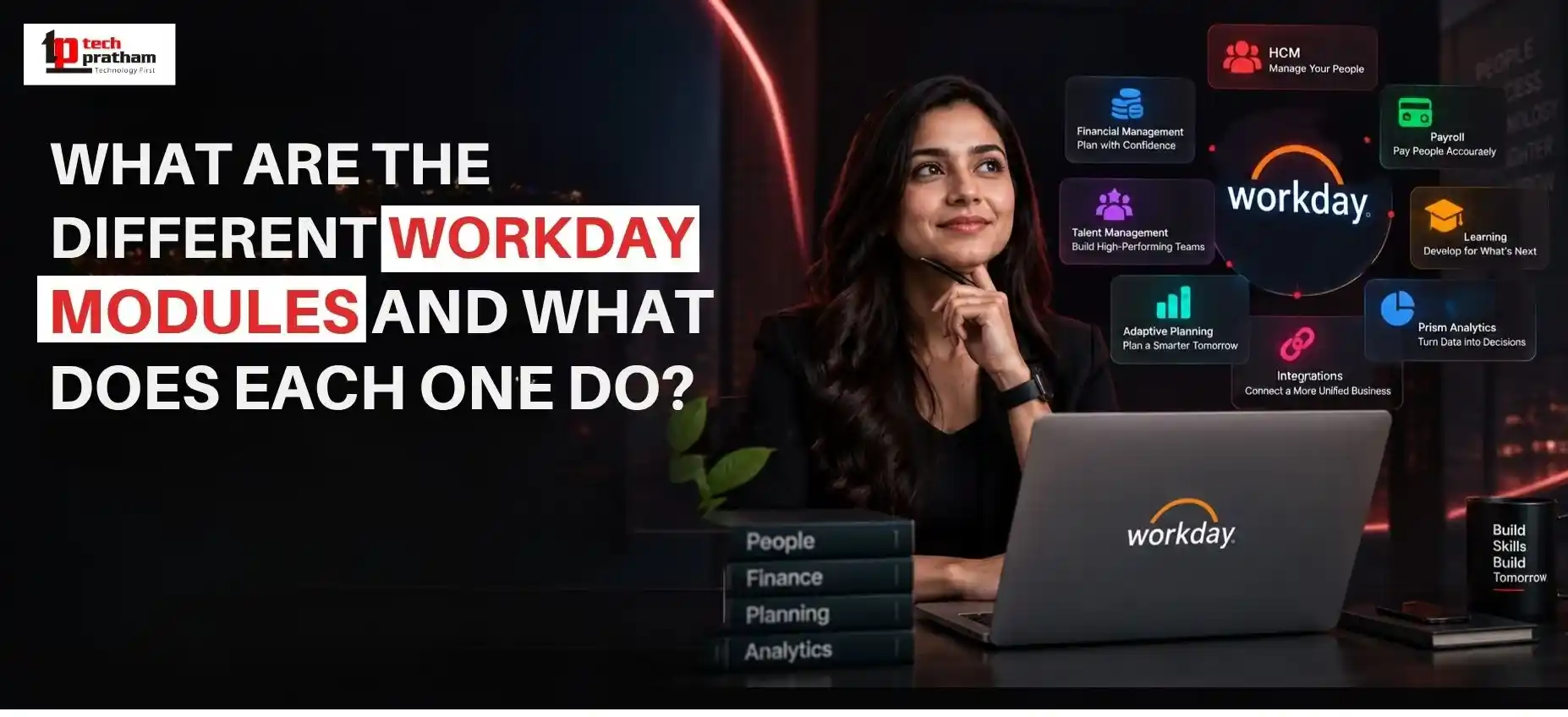
What Are the Different Workday Modules and What Does Each One Do?
By TechPratham TeamPublished September 7, 2026Updated September 7, 2026
Different Workday modules and their functions
Workday is widely used by organizations to manage important business processes across human resources, finance, payroll, talent, planning, analytics, and other areas. Instead of treating these functions as completely separate systems, Workday provides a connected platform where business data and processes can work together.
For someone new to Workday, however, the number of available modules can make the platform seem complicated. Workday HCM, Finance, Payroll, Recruiting, Talent Management, Learning, Reporting, Integrations, and Adaptive Planning all have different purposes.
Understanding these modules is useful not only for organizations evaluating Workday but also for professionals deciding which area they want to specialize in.
So, what are the major Workday modules, and what does each one actually do?
Let's break them down in simple terms.

What Is a Workday Module?

Workday connected business functions
A Workday module is a functional area of the Workday platform designed to support a particular business process.

For example:

  • HCM focuses on human resources and employee information.
  • Financial Management supports financial operations.
  • Recruiting supports hiring.
  • Learning supports employee development.
  • Payroll helps manage payroll-related processes.
  • Reporting and analytics help organizations understand business data.
  • Integrations allow Workday to exchange information with other systems.
These areas can work together rather than operating as isolated applications.

This connected approach is one reason understanding the overall Workday ecosystem is important before choosing a particular specialization.

What Is Workday HCM Used For?

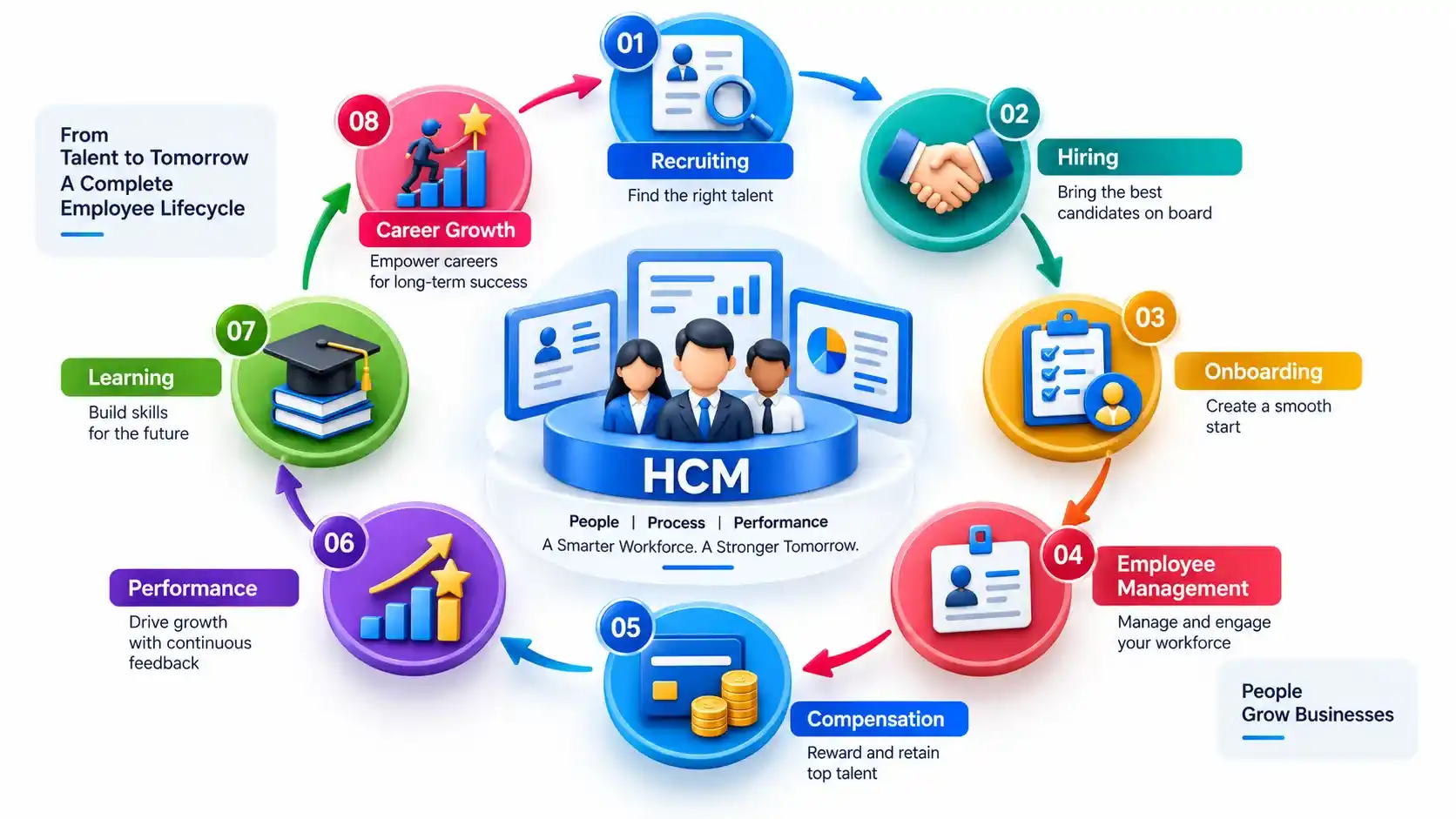
Workday HCM employee lifecycle
Workday Human Capital Management (HCM) is one of the most important areas of the Workday platform.

It supports organizations in managing employee-related information and processes throughout the employee lifecycle.

Depending on the organization's configuration, HCM can support areas such as:

  • Employee records
  • Organizational structures
  • Staffing
  • Workforce management
  • Compensation
  • Benefits
  • Absence management
  • Talent processes
  • Employee data
  • HR reporting
For example, when a new employee joins an organization, information created during the hiring process can become part of the employee's broader HR record.

This creates a more connected employee-management process instead of requiring HR teams to maintain the same information in multiple disconnected systems.

Who typically works with Workday HCM?

Professionals who work with HCM may include:

  • Workday HCM consultants
  • HR technology professionals
  • Workday administrators
  • Functional consultants
  • HRIS professionals
  • Business analysts
People with an HR background may find the functional side of HCM particularly relevant, while professionals with technical interests may explore configuration, reporting, integrations, or related technical areas.

What Does Workday Financial Management Do?

While HCM focuses primarily on people and workforce processes, Workday Financial Management focuses on financial operations.

Organizations can use financial capabilities to manage and analyze areas such as:

  • Accounting
  • Financial reporting
  • Accounts payable
  • Accounts receivable
  • Expenses
  • Revenue-related processes
  • Financial transactions
  • Financial planning and analysis
The advantage of connecting financial information with other business data is that organizations can get a broader view of their operations.

For example, workforce changes can have financial implications. When HR and financial information are managed within a connected environment, organizations can analyze these relationships more effectively.

Who can consider Workday Finance?

Workday Finance can be relevant to professionals with backgrounds in:

  • Accounting
  • Finance
  • Financial analysis
  • ERP systems
  • Business processes
  • Financial operations
A strong understanding of accounting concepts and business processes can be particularly useful for someone considering a functional Workday Finance career.

How Does Workday Recruiting Support Hiring?

Recruiting is another important area of the Workday ecosystem.

Workday Recruiting is designed to support organizations throughout the hiring process, from creating job opportunities to managing candidates and moving selected applicants toward employment.

Typical recruiting activities can include:

  1. Creating job requisitions
  2. Publishing job opportunities
  3. Managing candidate applications
  4. Supporting interview processes
  5. Managing candidate information
  6. Extending offers
  7. Moving candidates into the employee lifecycle
Recruiting can also connect with other HR processes.

For example, once a candidate accepts an offer, information from the recruiting process can contribute to the employee's transition into onboarding and broader HCM processes.
This illustrates why Workday knowledge is often broader than learning one isolated feature.

What Is Workday Talent Management?

Hiring an employee is only one part of workforce management. Organizations also need to develop employees, manage performance, identify skills, and support career growth.

This is where Workday Talent Management becomes relevant.

Talent-related capabilities can support processes such as:

  • Performance management
  • Goal management
  • Career development
  • Succession planning
  • Talent reviews
  • Skills management

For example, an organization may use performance information and skills data to understand where employees are performing well and where additional development may be useful.


Talent management therefore connects closely with learning and career development.

How Does Workday Learning Help Employees Develop Skills?

Organizations increasingly focus on continuous learning because employee skills can change quickly.

Workday Learning supports learning and development activities within the broader employee experience.


It can help organizations manage:


  • Learning content
  • Training programs
  • Required learning
  • Employee development
  • Learning activities
  • Skill development

For employees, learning is not simply about completing courses. It can also be connected to career development and the skills required for future roles.


For HR and learning teams, this creates an opportunity to connect workforce development with broader talent strategies.

What Is Workday Payroll?

Workday Payroll focuses on payroll-related processes and employee compensation calculations.


Payroll can involve complex information, including:


  • Employee pay
  • Earnings
  • Deductions
  • Taxes
  • Payroll calculations
  • Payroll reporting
  • Payroll-related employee information

Payroll also needs to work with other employee data.


For example, changes in an employee's position, compensation, working arrangements, or other HR information can affect payroll processing.

Because payroll is highly dependent on accurate employee and compensation data, understanding the relationship between payroll and HCM is important for professionals working in this area.

What Is Workday Reporting and Analytics?
What Is Workday Reporting and Analytics?
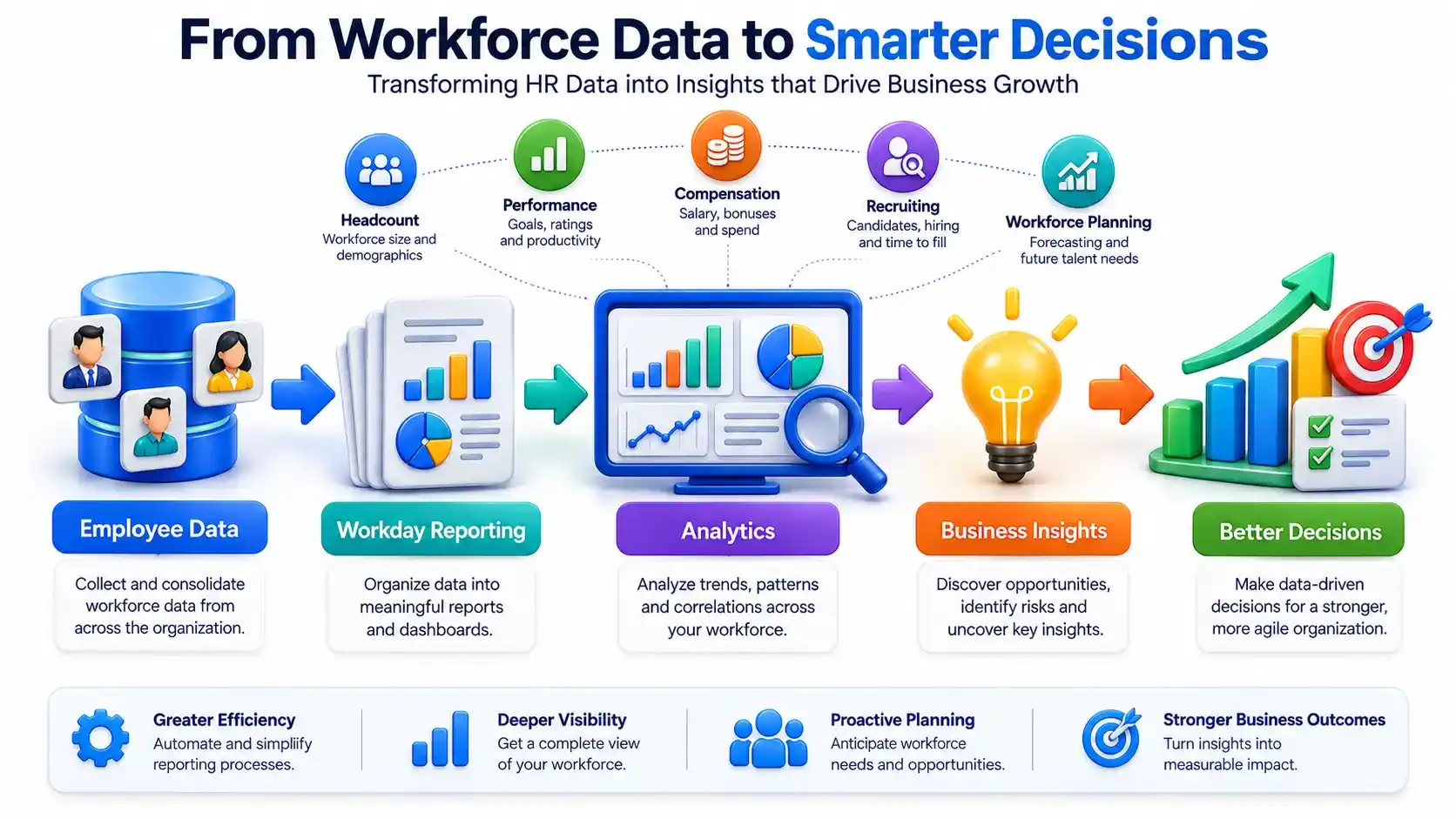
Workday contains large amounts of organizational data. Simply storing information isn't enough; organizations need ways to interpret it.

Workday Reporting and Analytics help users turn business data into useful information for decision-making.

Reporting can be used to analyze areas such as:

  • Headcount
  • Employee information
  • Compensation
  • Workforce trends
  • Financial information
  • Performance
  • Recruiting
  • Operational activity
For example, an HR team might want to understand how headcount has changed over time, while a finance team may need information for financial analysis.

This is why reporting skills can be valuable across different Workday specializations.

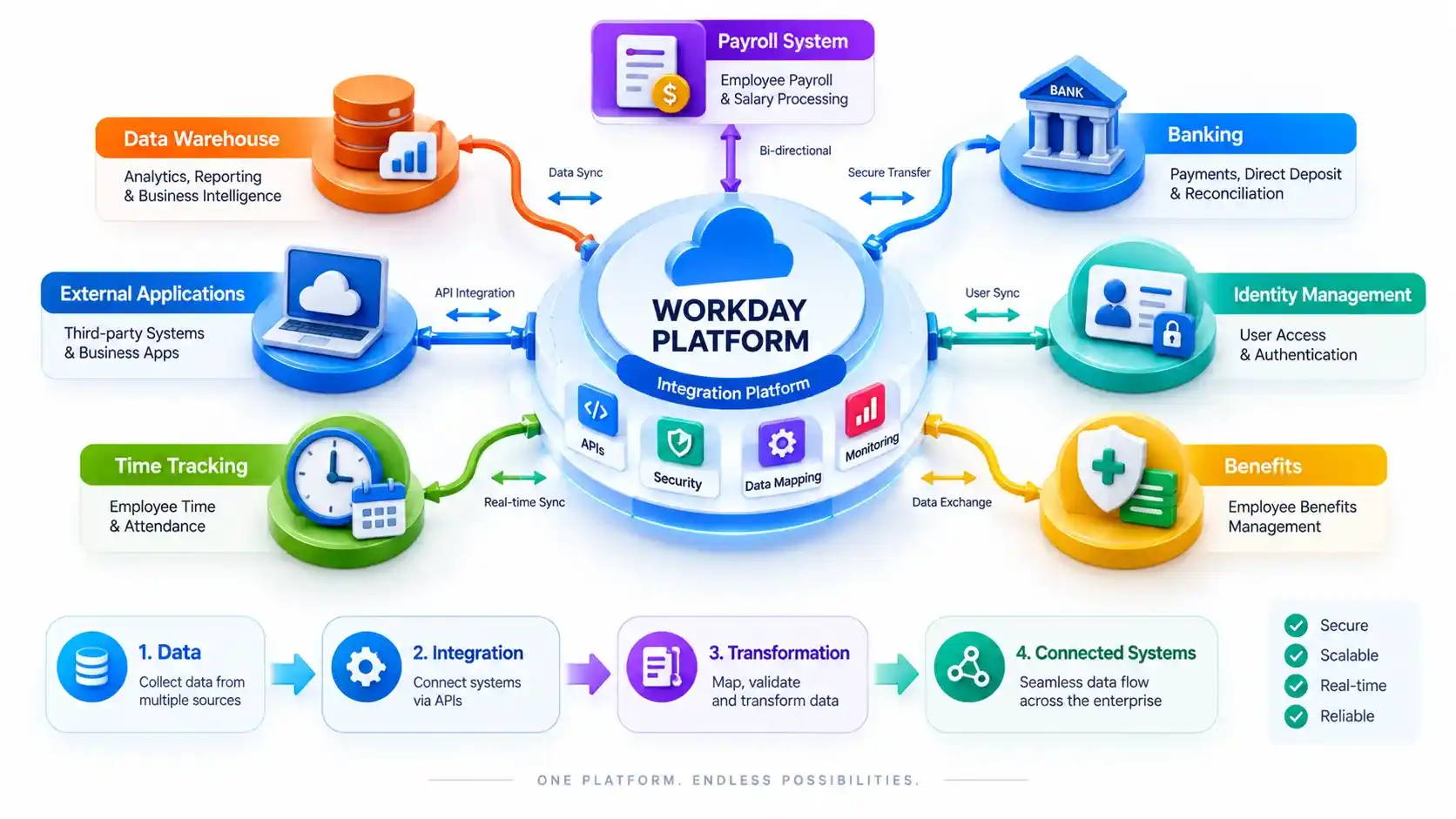
What Are Workday Integrations?
Workday integrations with external systems
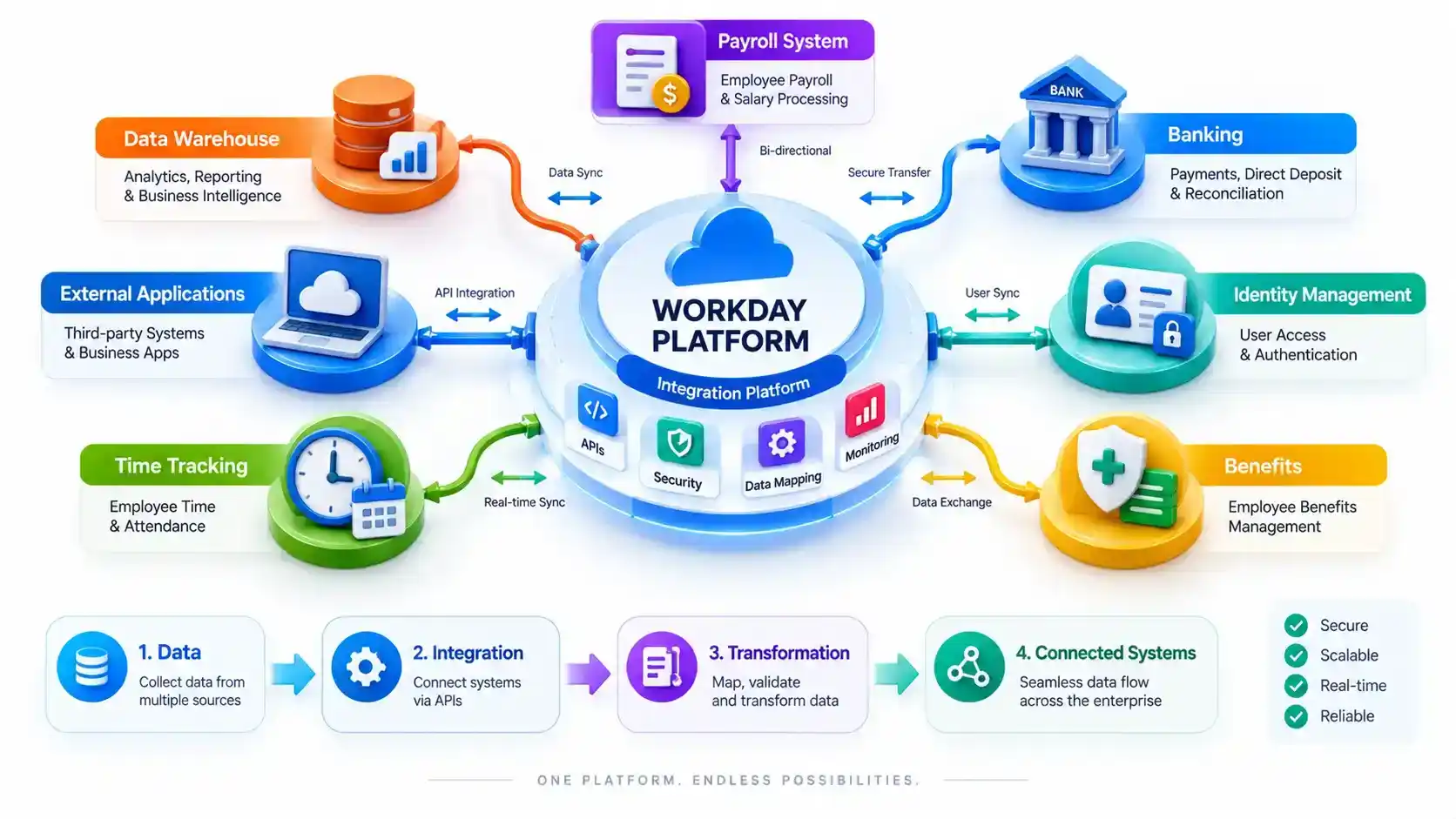
Modern organizations rarely use only one software system.

A company may use Workday alongside systems for:

  • Identity management
  • Payroll
  • Benefits
  • Finance
  • Banking
  • Recruiting
  • Time tracking
  • External applications
  • Data warehouses
Workday integrations allow information to move between Workday and external systems.

Integration professionals may work with concepts such as:

  • APIs
  • Web services
  • Data transformation
  • Integration systems
  • Security
  • Error handling
  • Data exchange
  • Integration monitoring
This area is generally more technical than many functional Workday roles.

Professionals interested in programming, APIs, enterprise applications, and system architecture may therefore find Workday integrations particularly interesting.

What Is Workday Adaptive Planning?

Organizations need to plan not only what is happening today but also what may happen in the future.

Workday Adaptive Planning supports planning, budgeting, forecasting, and related financial and workforce planning activities.

Organizations can use planning capabilities to work with areas such as:

  • Budgets
  • Forecasts
  • Workforce planning
  • Financial planning
  • Scenario analysis
  • Management reporting

For example, a company planning to expand into a new market may need to estimate hiring requirements, costs, revenue expectations, and other financial factors.


Planning tools can help organizations model different possibilities and make better-informed decisions.

How Do Workday Modules Work Together?

One of the most important things to understand about Workday is that its modules don't necessarily operate as completely independent systems.


Consider a simple employee journey:


Recruiting → Hiring → Onboarding → Core HCM → Compensation → Performance → Learning → Career Development


Different Workday capabilities can contribute to different stages of this journey.


Similarly, workforce information can have an impact on financial planning.


For example:


Employee Data → Workforce Analysis → Workforce Planning → Financial Planning


This interconnected approach allows organizations to work with business information in a more unified environment.


Which Workday Module Should Beginners Learn First?

There isn't one universal answer because the best starting point depends on a person's background and career objective.

Here's a simple way to think about it:

Background / Interest

Potential Workday Area

HR / Human Resources

Workday HCM

Recruitment

Workday Recruiting

Learning & Development

Workday Learning

Talent / Performance

Workday Talent Management

Accounting / Finance

Workday Financial Management

Payroll

Workday Payroll

Programming / APIs

Workday Integrations

Data / Reporting

Workday Reporting & Analytics

Planning / Finance

Workday Adaptive Planning

For someone completely new to Workday, starting with the overall Workday ecosystem and core HCM concepts can provide useful context before moving into a specialized area.

The right choice ultimately depends on previous experience, technical interests, and the type of role a person wants to pursue.

What Skills Are Useful for a Workday Career?

Learning a Workday module is only one part of becoming effective in the platform.

Professionals can benefit from developing a combination of functional, technical, and business skills.

Functional knowledge

Understanding business processes is important for functional roles.
Examples include:

  • HR processes
  • Finance processes
  • Payroll
  • Recruiting
  • Talent management
  • Organizational structures

Technical skills

Technical Workday roles may require knowledge of:

  • Integrations
  • APIs
  • Data concepts
  • Reporting
  • Security
  • XML
  • Web services
  • Development concepts

Analytical thinking

Workday professionals frequently need to understand business requirements, analyze problems, and translate them into practical solutions.

Communication

Consultants and analysts often work with HR teams, finance teams, IT departments, managers, and other stakeholders.

Being able to explain technical or functional concepts clearly can therefore be just as important as platform knowledge.

Can You Build a Career by Specializing in One Workday Module?
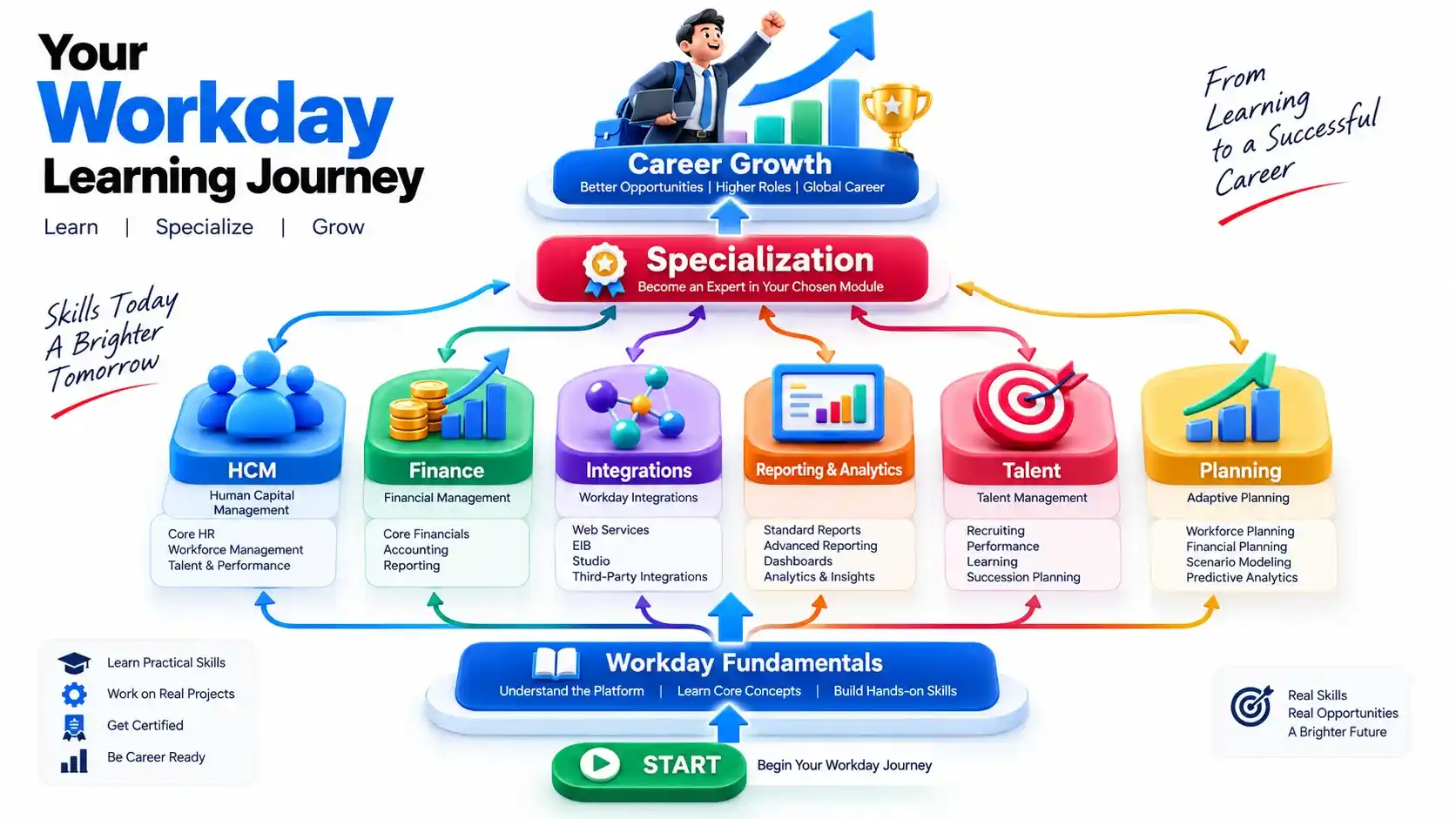
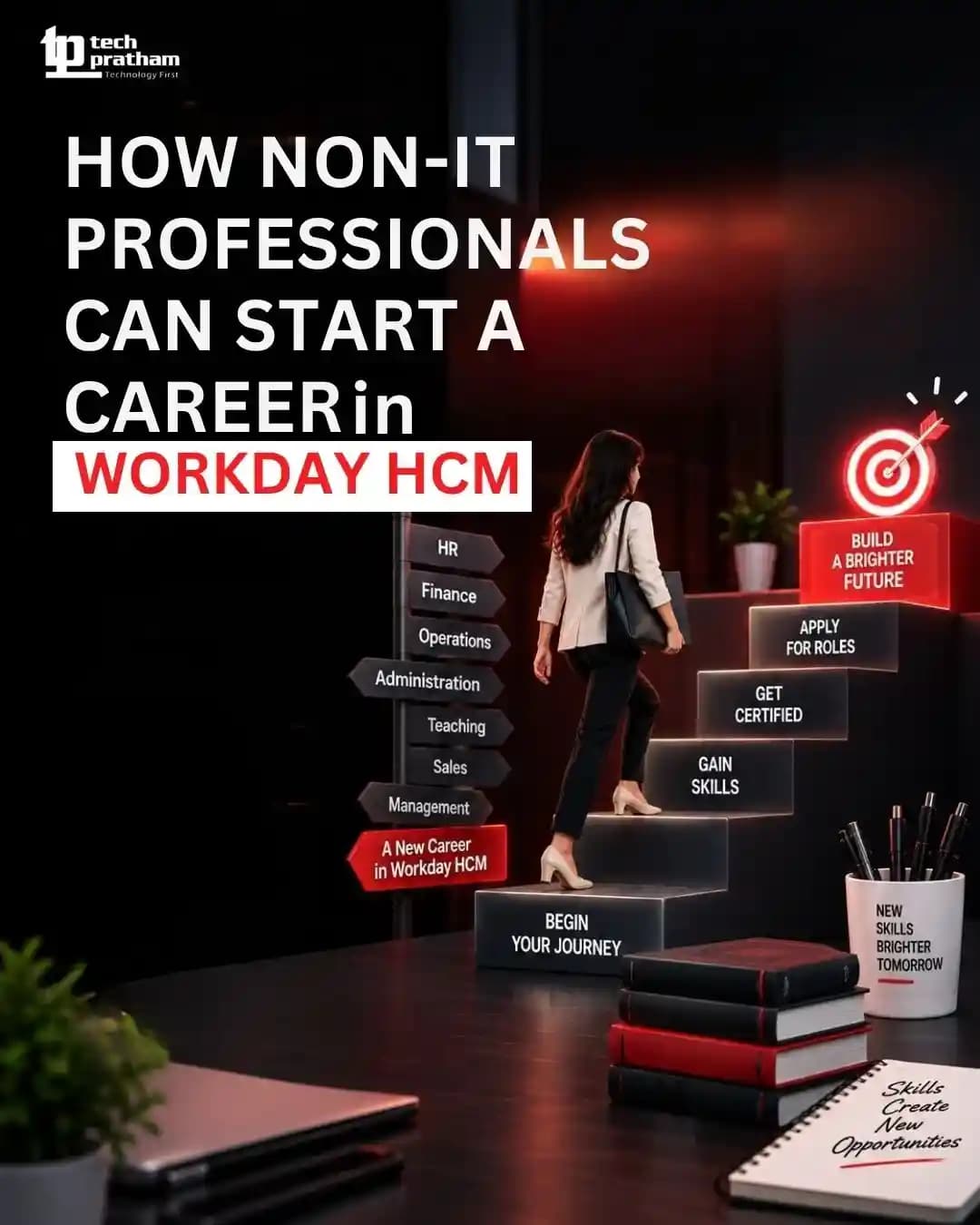
Workday career specialization roadmap
Yes. Workday is broad enough that professionals can specialize in particular areas.

For example, someone might focus primarily on:

  • Workday HCM
  • Workday Finance
  • Workday Payroll
  • Workday Integrations
  • Workday Reporting
  • Workday Recruiting
  • Workday Talent
However, specialization doesn't mean ignoring the rest of the ecosystem.

A professional who understands how their module interacts with other Workday areas can often understand business requirements more effectively.

For instance, an HCM professional who understands basic payroll, recruiting, reporting, and integration concepts may have a broader understanding of the employee lifecycle.

How Can Practical Workday Learning Help?

Reading about Workday modules provides a foundation, but practical learning is useful for understanding how business requirements translate into actual workflows.

Someone evaluating a Workday training program should look beyond the number of topics listed in a syllabus.

Useful things to evaluate include:

  • Module coverage
  • Hands-on exercises
  • Business scenarios
  • Reporting practice
  • Integration concepts
  • Configuration experience
  • Interview preparation
  • Trainer expertise
  • Learning support
For professionals comparing learning options, you can also review Workday training programs based on curriculum, practical exposure, and the specialization you want to pursue.

The link is intentionally placed here because it supports the discussion rather than interrupting the informational sections.

What Is the Future of Workday Skills?

The role of enterprise software professionals is changing as organizations increasingly use automation, analytics, AI-assisted capabilities, and skills-based approaches.

This means future Workday professionals may need more than basic platform knowledge.

Important areas to watch include:

  • Automation
  • Data analysis
  • AI-assisted workflows
  • Skills management
  • Workforce planning
  • Reporting and analytics
  • Integrations
  • Business process understanding
The exact tools and capabilities will continue to evolve, but the underlying need remains the same: professionals who can understand business processes and use enterprise technology effectively.

Frequently Asked Questions About Workday Modules

How many Workday modules are there?

Workday has a broad ecosystem of products and capabilities rather than a simple fixed list of modules. Major areas include HCM, Financial Management, Recruiting, Talent Management, Learning, Payroll, Reporting and Analytics, Integrations, and Adaptive Planning.

Which Workday module is best for beginners?

For many people with an HR background, Workday HCM can be a practical starting point because it introduces core employee and workforce processes. Finance, technical, reporting, and other areas may be better suited to people with relevant backgrounds.

Is Workday HCM different from Workday Finance?

Yes. Workday HCM primarily focuses on human resources and workforce-related processes, while Workday Financial Management focuses on financial operations and related business processes.

Is Workday Integration a technical field?

Generally, yes. Workday integration roles can involve APIs, web services, data transformation, security, and system-to-system data exchange, making technical knowledge useful.

Which Workday module has the most career opportunities?

Career opportunities vary by market, employer requirements, experience, and specialization. Instead of choosing a module only because it appears popular, it is better to consider your existing skills and the type of role you want.

Do I need programming knowledge to learn Workday?

Not necessarily. Some Workday roles are primarily functional, while others are technical. Programming and integration knowledge become more relevant for technical and integration-focused roles.

Is Workday useful only for HR teams?

No. Workday supports multiple business functions, including HR, finance, planning, analytics, recruiting, learning, payroll, and related enterprise processes.

Conclusion

Workday is much broader than a single HR application. Its ecosystem brings together different capabilities for human resources, finance, recruiting, payroll, talent, learning, reporting, integrations, planning, and analytics.

Understanding how these areas connect can make it easier for beginners to decide which specialization fits their background and career goals.

If you're starting your Workday journey, don't try to learn everything at once. First understand the Workday ecosystem, then choose a functional or technical area that matches your interests. From there, build practical knowledge through real-world scenarios, reporting, business processes, and hands-on exercises.

The strongest Workday professionals aren't simply those who know where to click in the platform. They understand why a business needs a particular process, how different Workday areas interact, and how technology can support better business decisions.