

Pass Your ServiceNow CAD Exam 2026 February: Techpratham
Table of Contents
A Proven Strategy to Pass the ServiceNow CAD Exam (February 2026)
Clearing the ServiceNow Certified Application Developer (CAD) exam requires more than reading documentation or memorizing questions. Servicenow CAD 2026 exam strongly tests your ability to design, build, secure, and troubleshoot applications using real ServiceNow development logic. A focused plan that combines blueprint-driven study, hands-on practice, and exam strategy delivers consistent results.
ServiceNow CAD Exam 2026 – Quick Overview for Aspirants
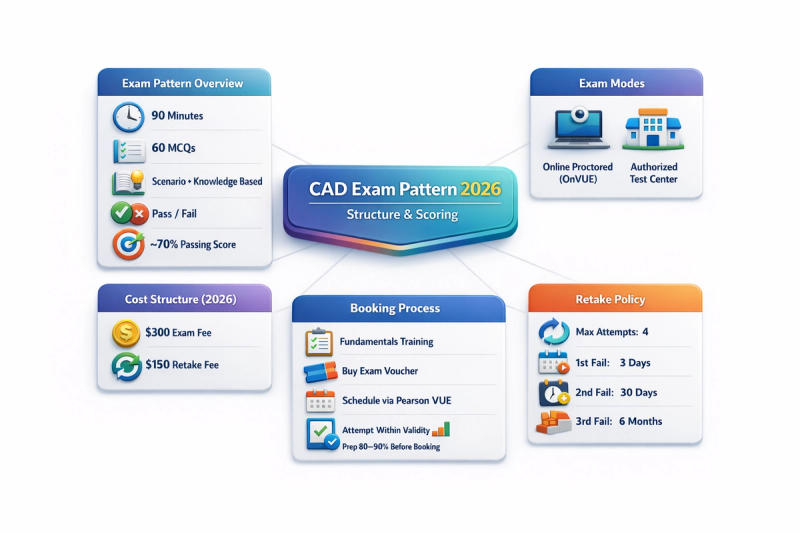
ServiceNow Certified Application Developer (CAD) certification proves your ability to build, customize, and deploy applications on the ServiceNow platform. Here’s a short, topic-wise summary you can directly add to your blog:
Exam Pattern: 90 minutes, 60 MCQ/MSQ questions, result in Pass/Fail format. Passing score isn’t officially disclosed (generally estimated around 70%). Focus areas include application design, tables & data modeling, scripting, UI policies, security, and deployment.
Exam Modes: Conducted via Pearson VUE in two formats — Online (OnVUE with live proctoring) or at an authorized testing center. Certification remains the same in both modes.
Cost Structure: Exam fee is $300, retake fee is $150 per attempt. Mandatory “Application Development Fundamentals” training is required before booking (approx. $500 if self-sponsored). Total initial investment may reach around $800.
Booking Process: Complete mandatory training → Purchase voucher → Schedule via Pearson VUE → Choose exam mode → Appear within 90 days of voucher purchase.
Retake Policy: Maximum 4 attempts (1 + 3 retakes). Waiting periods increase after each failure (3 days → 30 days → 6 months). Failing all attempts requires re-enrollment and fresh payment.
Bottom Line: The CAD certification is a structured, investment-driven credential. Smart preparation helps you clear it in the first attempt and avoid extra cost or delay.
Start with the CAD Exam Blueprint
Begin by reviewing the official ServiceNow CAD exam blueprint and treat it as your syllabus. Every topic listed—application scope, data modeling, scripting, security, and automation—can appear in scenario-based questions. Studying outside the blueprint adds noise and reduces exam efficiency.
6–8 Week CAD Exam Preparation Plan
Weeks 1–2: Core Development Foundation Build a strong understanding of platform fundamentals such as tables, dictionary entries, forms, lists, application scopes, update sets, and basic security concepts. This phase ensures you understand how applications are structured within ServiceNow.
Weeks 3–5: Deep-Dive with Hands-On Development For each CAD blueprint topic, combine theory with lab work in a personal developer instance. Focus on creating custom tables, writing business rules and client scripts, implementing Script Includes, configuring Flow Designer automations, and enforcing access using ACLs. Understanding how components interact is critical for exam scenarios.
Weeks 6–7: Practice Exams and Gap Closure Attempt timed mock exams to simulate real test conditions. Analyze incorrect answers carefully and recreate weak scenarios in your instance. The goal is not just scoring higher, but understanding why certain platform behaviors occur.
Final Week: Exam Readiness & Revision Review scripting patterns, ACL evaluation logic, Flow Designer use cases, update set behavior, and application packaging. Avoid last-minute cramming and focus on clarity and confidence.
Hands-On Practice That Actually Helps You Pass
Practical experience is non-negotiable for the CAD exam. Candidates should be comfortable building:
- A custom application with tables, forms, lists, and relationships
- Business rules, client scripts, UI actions, and Script Includes working together
- Flow Designer flows with conditions, approvals, and notifications
- Role-based and condition-based ACLs
- Update sets and application scopes for safe migration
If you can build these without step-by-step instructions, you are exam-ready.
High-Impact CAD Topics to Master
The CAD exam consistently tests:
- Data modeling and dictionary configuration
- Client-side vs server-side scripting logic
- Security roles and ACL execution order
- Flow Designer vs legacy workflows
- Update sets, application scope, and deployment concepts
- REST integrations and basic API usage
- Debugging using system logs and script debugger
Mastery of these areas separates pass candidates from repeat attempts.
Smart Exam Technique for CAD Success
Read every question carefully and watch for keywords like best approach, most effective, or minimum configuration. Eliminate incorrect choices first and align final answers with ServiceNow best practices—security-first, configuration over customization, and scalable design.
Manage time wisely, flag difficult questions, and return after completing easier ones.
Avoid These Common CAD Exam Mistakes
Many candidates fail due to over-reliance on memory-based exams, weak scripting fundamentals, or lack of clarity around application scope and update sets. The CAD exam rewards understanding platform behavior—not UI navigation steps.
Final Readiness Checklist Before Exam Day
You’re ready for the February 2026 CAD exam if you can:
- Score consistently above 80% in timed practice tests
- Build core application components independently
- Explain ACL logic, Flow Designer use cases, and Glide scripting patterns
- Understand how ServiceNow handles updates, scope, and deployment
Passing the ServiceNow CAD Exam with Confidence
Success in the ServiceNow CAD exam comes from intentional practice mapped to the official blueprint, reinforced by real application development and structured revision. With the right preparation strategy and hands-on focus—supported by guidance from Techpratham—you can approach the February 2026 exam with clarity and confidence.
Summary:
The ServiceNow CAD Exam (February 2026) tests real-world application development skills—not memorization. Success depends on studying strictly from the official blueprint, building hands-on experience in a developer instance, and following a structured 6–8 week preparation plan. Candidates must master data modeling, scripting, security (ACLs), Flow Designer, update sets, and deployment concepts. With smart exam strategy, consistent practice tests, and a focus on platform behavior, the CAD certification can be cleared confidently on the first attempt, saving time and cost.