
The Foundation of Modern IT Operations: An Insider’s Introduction to ServiceNow & ITSM
Table of Contents
Over the last decade and a half, I’ve watched organizations struggle with the same fundamental challenge: IT is growing faster than their ability to manage it. When IT fails, the business stops, causing delays, lost revenue, and frustrated teams. Traditional approaches and ad-hoc tools can’t keep up with the speed and complexity of modern IT environments. This is where IT Service Management (ITSM) and platforms like ServiceNow make a real difference. They don’t just track incidents—they transform how IT operates, connecting processes, people, and technology. Understanding this foundation is the first step toward running IT more efficiently and delivering real business value
Understanding ServiceNow and ITSM Foundations
To effectively leverage ServiceNow, it’s crucial to first understand the foundations of IT Service Management (ITSM). At its core, ITSM is about treating IT as a service provided to the business rather than just a collection of technologies. This approach ensures that IT operations are structured, predictable, and aligned with business goals. Organizations that adopt ITSM frameworks gain clarity in workflows, reduce downtime, and improve overall service delivery. Understanding these foundational principles sets the stage for implementing tools like ServiceNow in a way that maximizes efficiency and business impact.
Why IT Service Management (ITSM) Matters Today
In today’s fast-paced digital environment, ITSM is more important than ever. Businesses rely on technology for nearly every aspect of operations, and even minor IT failures can lead to delays, financial losses, and frustrated employees. Traditional ad-hoc methods and fragmented tools are no longer sufficient to manage the scale and complexity of modern IT systems. ITSM provides a structured approach to managing incidents, changes, and service requests, ensuring that IT teams can respond efficiently, prevent recurring problems, and deliver a consistent, reliable experience to end-users.
ServiceNow: More Than a Traditional Ticketing Tool
While many people initially think of ServiceNow as a simple ticketing system, it is much more than that. ServiceNow is a comprehensive platform that automates workflows, integrates processes across departments, and provides real-time visibility into IT operations. It allows organizations to manage incidents, problems, changes, and requests efficiently while reducing manual work and errors. Beyond IT, ServiceNow also extends into HR, security, and customer service, making it a versatile tool that drives operational excellence across the enterprise.
ITIL and ServiceNow: Process Meets Platform
ITIL (Information Technology Infrastructure Library) is the global best-practice framework for IT service management, providing guidance on how IT services should be designed, delivered, and improved. ServiceNow complements ITIL by providing a platform that digitizes these best practices out-of-the-box. This integration ensures that organizations follow consistent processes, maintain compliance, and achieve efficiency in their IT operations. By combining ITIL principles with ServiceNow’s platform capabilities, businesses can transform IT from a reactive support function into a proactive, strategic driver of value.
Core ITSM Applications in ServiceNow
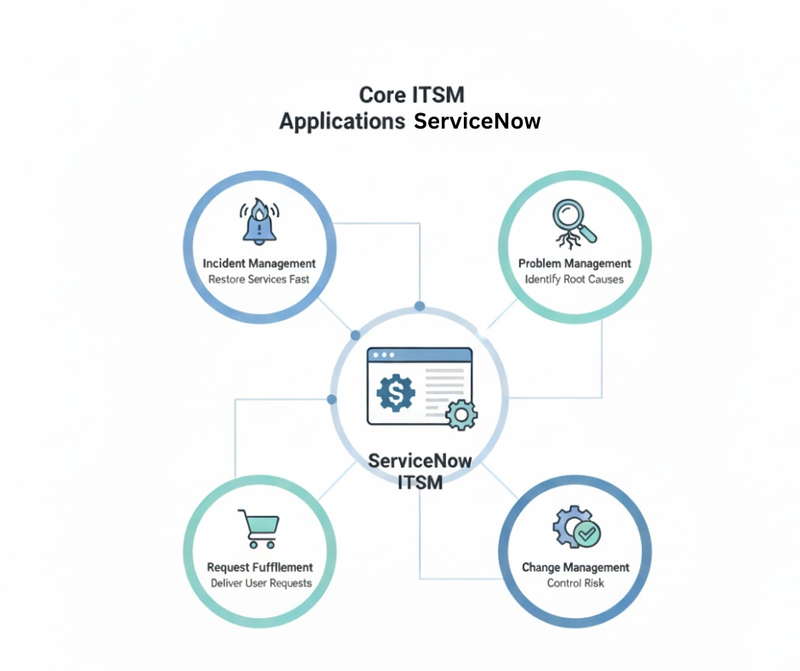
Incident Management: Restoring Services Fast
Incident Management is often called the “firefighters” of IT operations because it focuses on addressing unplanned interruptions to services as quickly as possible. When an incident occurs—whether it’s a server outage, a network disruption, or a software failure—the primary goal is to restore normal service operation with minimal impact on the business. Quick resolution not only prevents productivity losses but also ensures user satisfaction and trust in IT. Effective Incident Management relies on well-defined processes, automated workflows, and clear communication channels, all of which ServiceNow provides seamlessly.
ServiceNow enhances Incident Management by centralizing ticket creation, tracking, and resolution. Alerts can be automatically prioritized based on business impact, and knowledge articles help IT staff resolve recurring issues faster. Additionally, dashboards provide real-time visibility into incident trends, allowing teams to identify patterns before they escalate into major outages. By combining speed, structure, and data-driven insights, Incident Management in ServiceNow ensures that IT teams are always prepared to respond efficiently and prevent disruption to business operations.
Problem Management: Identifying Root Causes
Problem Management is the “detective” function of IT operations. While Incident Management focuses on immediate resolution, Problem Management digs deeper to identify the underlying causes of recurring incidents. Its objective is to prevent incidents from happening in the first place by analyzing trends, diagnosing root causes, and implementing permanent fixes. Without effective Problem Management, IT teams may spend most of their time firefighting the same issues repeatedly, which drains resources and increases operational risk.
ServiceNow facilitates Problem Management by providing structured workflows to investigate and document root causes, track known errors, and implement solutions efficiently. Integration with Incident Management allows problems to be linked to related incidents, giving IT teams a clear view of recurring issues. Proactive alerts and reporting tools help organizations anticipate risks, plan improvements, and reduce the likelihood of future disruptions. In essence, Problem Management transforms reactive IT into a proactive, strategic function that improves overall system reliability and business continuity.
Change Management: Controlling Risk in IT Environments
Change Management acts as the “gatekeeper” of IT operations. Many major IT outages are caused by uncontrolled or poorly planned changes. Change Management ensures that updates to systems—whether software patches, server upgrades, or network modifications—are reviewed, approved, and scheduled in a controlled manner. By managing risk systematically, Change Management protects the business from unplanned downtime and service interruptions, while also enabling innovation and system improvements.
ServiceNow streamlines Change Management with automated workflows, approvals, and impact assessments. Changes can be categorized by risk level, and scheduled windows minimize disruption to users. The platform’s integration with the CMDB allows IT teams to see dependencies and assess potential impacts before implementing a change. This visibility, combined with standardized procedures, ensures that changes are executed safely, efficiently, and with accountability. Ultimately, Change Management in ServiceNow balances innovation with operational stability, keeping IT aligned with business needs.
Request Fulfillment: Delivering Services to End Users
Request Fulfillment is often called the “personal shopper” of IT services because it focuses on providing end users with what they need—quickly and efficiently. Not every IT ticket is a crisis; sometimes employees just need a new laptop, software access, or a password reset. Request Fulfillment ensures that these service requests are processed smoothly, with minimal friction for the end user. It’s all about delivering a consumer-like experience within the enterprise IT environment.
ServiceNow enhances Request Fulfillment through self-service portals, automated approval workflows, and predefined catalog items that users can request with just a few clicks. Integration with other ITSM modules ensures that requests are tracked, fulfilled, and reported consistently. Additionally, analytics provide insights into common requests, helping IT teams optimize workflows and allocate resources effectively. By making everyday IT services fast, reliable, and transparent, Request Fulfillment strengthens user satisfaction and frees IT staff to focus on higher-value initiatives.
Key Roles in a ServiceNow ITSM Implementation
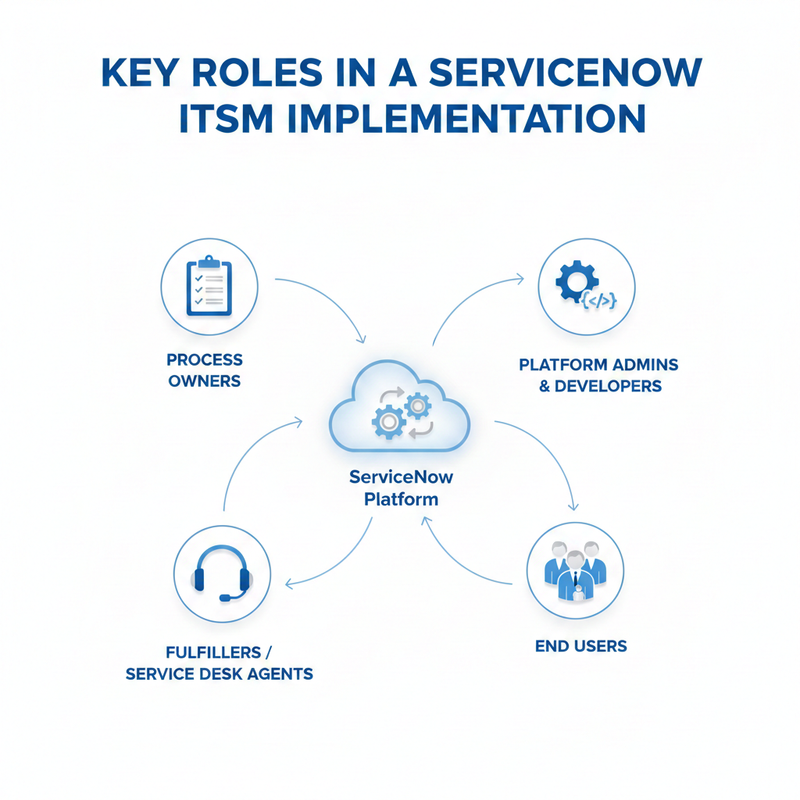
Process Owners: Defining Policies and Governance
Process Owners are the guardians of ITSM processes and play a critical role in ensuring that the platform operates according to defined policies. They are responsible for designing, implementing, and maintaining processes such as Incident Management, Change Management, and Problem Management. Their primary focus is on “what should be done” within ITSM, ensuring that all activities align with business objectives and compliance requirements.
In a ServiceNow implementation, Process Owners define the rules, workflows, and approval structures that guide the platform. They collaborate with administrators and developers to translate business policies into system configurations, ensuring that ServiceNow reflects the intended process rather than forcing users to bypass or workaround. This alignment helps prevent inconsistencies and errors, which are common when processes are poorly defined or misunderstood.
Additionally, Process Owners continuously review and improve processes based on performance metrics, incident trends, and user feedback. Their proactive involvement ensures that ITSM processes remain relevant, efficient, and scalable. By defining governance and policies clearly, Process Owners create the foundation for a successful and sustainable ServiceNow deployment.
Platform Administrators and Developers
Platform Administrators and Developers are the technical experts responsible for configuring, customizing, and maintaining the ServiceNow environment. Administrators handle user management, roles, permissions, and system settings to ensure that the platform operates securely and efficiently. Developers, on the other hand, build workflows, automate processes, and extend platform capabilities to meet organizational requirements.
These roles work closely with Process Owners to translate process designs into functional solutions within ServiceNow. For example, they might configure automated incident routing, approval workflows, or integrations with other business applications. Their expertise ensures that the platform supports organizational goals without compromising performance or security.
Moreover, administrators and developers continuously monitor system health, troubleshoot issues, and implement updates to maintain a stable and optimized environment. Their proactive management minimizes downtime, supports seamless process execution, and enables IT teams to leverage the full potential of ServiceNow for service delivery and operational efficiency.
Fulfillers and Service Desk Agents
Fulfillers and Service Desk Agents are the frontline staff who execute ITSM processes daily. They handle incidents, service requests, changes, and problems, ensuring that issues are resolved and requests are completed in a timely and accurate manner. These individuals are the bridge between the ITSM platform and the end users, translating processes and workflows into actionable service delivery.
ServiceNow empowers fulfillers and agents with tools such as ticket tracking, knowledge articles, and automated workflows to improve efficiency. By standardizing tasks and providing clear guidance, the platform enables them to resolve incidents faster, reduce errors, and maintain consistent service quality. Their work directly impacts user satisfaction and the perception of IT within the organization.
In addition, fulfillers and agents provide valuable feedback to Process Owners and administrators about recurring issues, bottlenecks, and potential improvements. This feedback loop helps refine processes, optimize system configurations, and ensure that ServiceNow evolves to meet the changing needs of the business.
End Users: The Business Customers
End Users are the ultimate consumers of IT services and play a crucial role in the success of ServiceNow ITSM implementation. They submit incidents, requests, and feedback, and their interactions with the platform determine how effectively IT can deliver services. Satisfied end users indicate that processes are efficient, systems are reliable, and IT is meeting business expectations.
ServiceNow enhances the end-user experience through self-service portals, knowledge bases, and intuitive request catalogs. These tools allow users to resolve minor issues independently, submit requests quickly, and track progress without constant support desk interaction. A well-designed user experience reduces frustration, increases adoption rates, and allows IT staff to focus on more strategic tasks.
Moreover, end users provide critical input that shapes process improvement initiatives. Their usage patterns, feedback, and reporting on recurring issues help IT teams optimize workflows, enhance the CMDB, and improve service delivery over time. Engaging end users effectively ensures that ServiceNow delivers maximum value to both IT and the broader business.
ServiceNow Platform Architecture and Setup Basics
ServiceNow Platform Architecture Explained
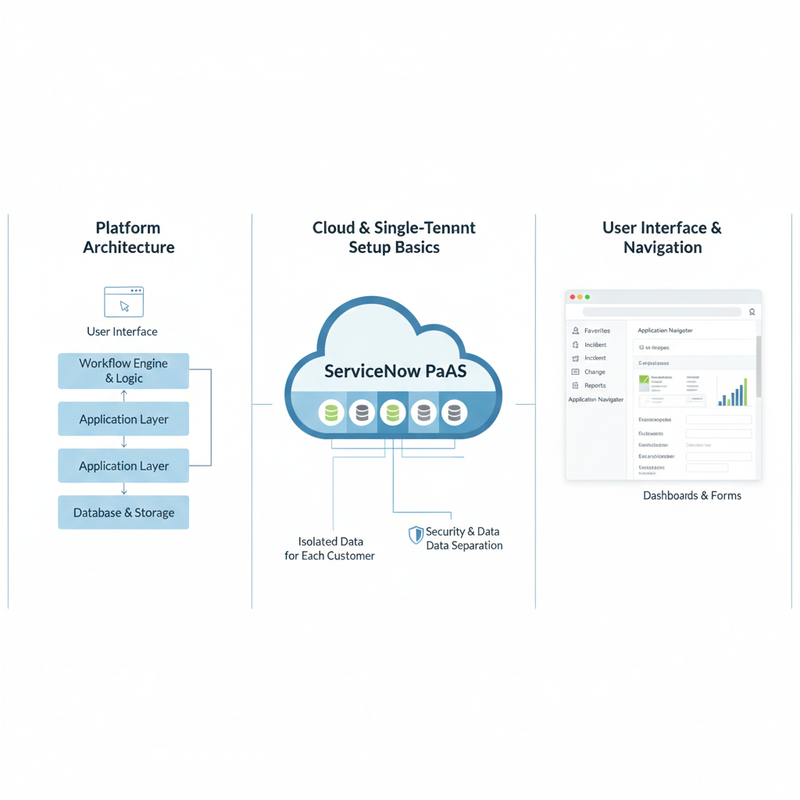
ServiceNow is built on a modern cloud-based architecture that allows organizations to streamline IT operations, automate workflows, and integrate multiple business processes into a single platform. The architecture is designed to support scalability, flexibility, and reliability, making it suitable for enterprises of all sizes. At its core, ServiceNow is a Platform-as-a-Service (PaaS), which means that it provides a framework for building, customizing, and running applications without the need to manage the underlying infrastructure.
This architecture is modular, allowing organizations to deploy different ServiceNow applications—such as ITSM, ITOM, HR, and Security—while maintaining a unified system for data and processes. Each module interacts seamlessly with others, ensuring that changes or incidents in one part of the organization can be tracked, managed, and resolved efficiently across the platform. This integration eliminates silos, reduces manual errors, and provides comprehensive visibility into IT operations and business services.
Furthermore, ServiceNow’s architecture emphasizes automation and workflow optimization. It provides a rules engine, APIs, and workflow designer tools that allow IT teams to model business processes digitally. By leveraging these architectural features, organizations can enhance operational efficiency, improve service delivery, and ensure that their IT services align with business priorities.
Cloud-Based and Single-Tenant Architecture
ServiceNow is a cloud-based platform, which means that organizations do not need to manage servers, databases, or infrastructure themselves. This eliminates the overhead of hardware management, reduces operational costs, and allows teams to focus on service delivery and process improvements. Updates, patches, and security measures are handled by ServiceNow, ensuring the platform remains up-to-date and compliant with industry standards.
Additionally, ServiceNow uses a single-tenant architecture for each customer instance. This means that your organization has its own dedicated database and environment, which is separate from other customers. This design provides enhanced security, better performance, and complete data isolation. Unlike multi-tenant systems, single-tenancy reduces the risk of data leakage and allows for greater customization without affecting other organizations using the platform.
The cloud and single-tenant combination provides both flexibility and control. Organizations can scale their usage up or down, customize the platform to meet specific business needs, and maintain regulatory compliance. It also enables disaster recovery and high availability features, ensuring that IT services remain reliable and continuous even in case of disruptions.
Navigating the ServiceNow Interface
ServiceNow provides a web-based interface that is intuitive and designed for users of varying technical expertise. The interface is divided into key sections, with the Application Navigator on the left providing access to all modules, applications, and settings, and the main content frame displaying forms, lists, dashboards, and reports. This layout allows users to quickly locate the functionality they need and perform tasks efficiently.
The platform also supports role-based access, meaning that different users see only what they need based on their responsibilities. For example, a service desk agent may see incidents and service requests, while a Change Manager can access workflows, approvals, and risk assessment tools. This makes the interface personalized, secure, and focused on relevant tasks.
ServiceNow training in India further enhances navigation through search, filters, and favorites, allowing users to quickly locate specific records or workflows. Dashboards and reports provide at-a-glance insights into key metrics, enabling proactive decision-making. Overall, the interface is designed to maximize usability, reduce training requirements, and ensure that IT teams can leverage the platform effectively from day one.
Managing Users, Roles, and Security in ServiceNow
User and Group Management Best Practices
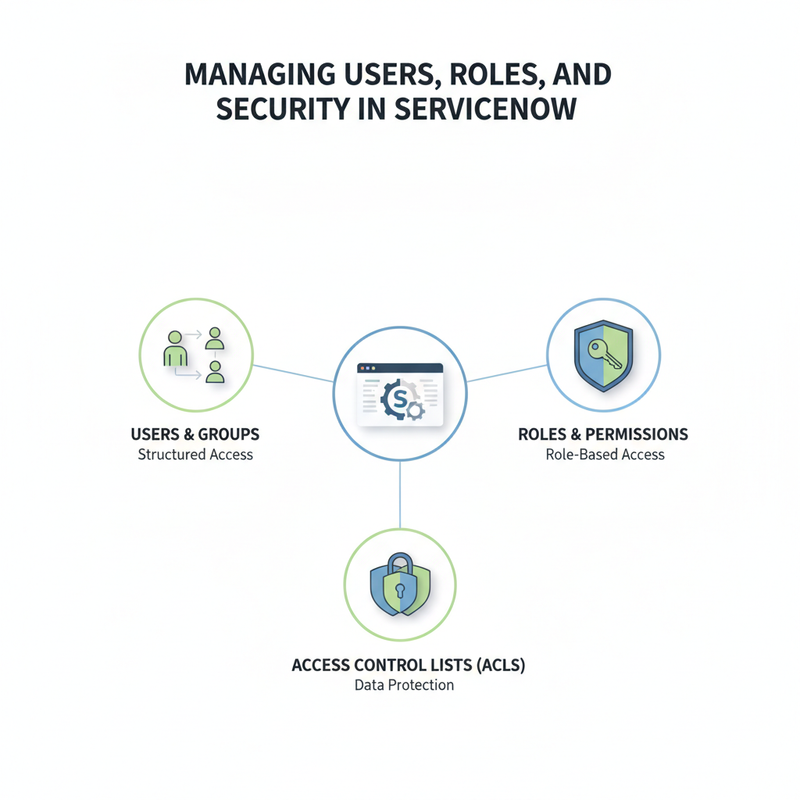
User and group management is the foundation of security and efficiency in ServiceNow. Users are the individuals who interact with the platform, and groups are collections of users with similar responsibilities, such as the Service Desk team or the Network team. Organizing users into groups simplifies administration, streamlines permissions, and ensures consistent access to relevant applications and records. Properly structured groups make it easier to manage large teams, particularly in enterprise environments with hundreds or thousands of users.
Best practices include assigning users to groups based on their job functions rather than individual responsibilities. This approach reduces administrative overhead and prevents mistakes when onboarding or offboarding employees. Additionally, regular audits of user accounts and group memberships help maintain security, remove inactive accounts, and ensure that access remains aligned with organizational policies.
ServiceNow also provides tools to automate user provisioning and de-provisioning by integrating with identity management systems. This ensures that users have the right access from day one and removes the risk of unauthorized access. Following these best practices in user and group management lays the groundwork for a secure, efficient, and compliant ServiceNow environment.
Role-Based Access in ServiceNow
Role-based access is a critical component of ServiceNow’s security model. Roles define what users can see and do within the platform, allowing organizations to enforce the principle of least privilege. For instance, a service desk agent may have the “itil” role to manage incidents, while an administrator role grants full control over the system. By carefully assigning roles, organizations can balance operational efficiency with robust security.
Roles can be assigned directly to users or, more commonly, to groups to simplify management. This ensures that all members of a team inherit the same permissions, reducing errors and improving consistency. Roles can also be layered, where one user may hold multiple roles for different functions, such as combining an “itil” role with a “change approver” role. This flexibility supports diverse workflows without compromising security.
Furthermore, role-based access helps streamline auditing and compliance. By clearly defining roles and documenting who has access to what, organizations can quickly respond to regulatory requirements, internal audits, or security investigations. Role-based access management is essential for protecting sensitive data and ensuring that users only interact with the portions of the platform that are relevant to their responsibilities.
Access Control Lists (ACLs): Securing Data and Processes
Access Control Lists (ACLs) are the most granular layer of security in ServiceNow. While roles define overall access, ACLs determine exactly which records, fields, or tables a specific user can read, write, or delete. ACLs ensure that sensitive information, such as employee records, financial data, or confidential project details, is protected from unauthorized access.
ACLs can be applied to individual records, forms, or entire tables, and they often combine conditions and scripts to provide flexible, context-sensitive control. For example, a manager may have write access to employee records in their department but only read access to records in other departments. By configuring ACLs properly, organizations can enforce compliance, prevent data leaks, and reduce the risk of accidental modifications.
Additionally, ACLs work in tandem with roles and groups to create a robust, multi-layered security model. Regular review and testing of ACL configurations are critical to maintaining security, especially as workflows, roles, or organizational structures evolve. Properly implemented ACLs provide confidence that ServiceNow data is secure, accessible only to authorized personnel, and aligned with internal policies and regulatory standards.
The CMDB: The Core of Effective ITSM
What Is the ServiceNow CMDB?
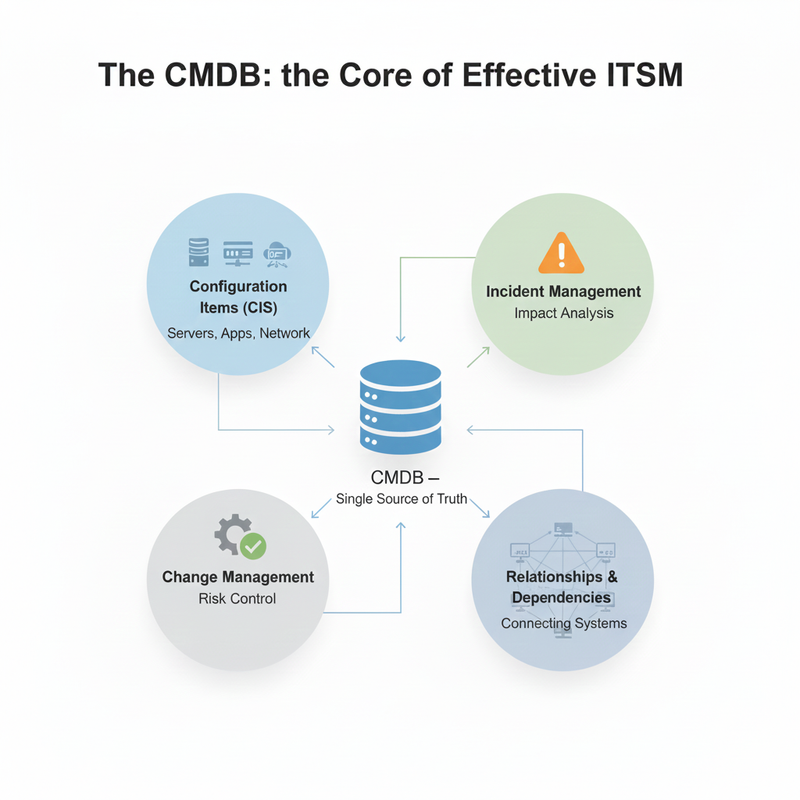
The Configuration Management Database (CMDB) is often described as the “heart” of IT Service Management (ITSM). It serves as a centralized repository for storing detailed information about all the IT assets and components—known as Configuration Items (CIs)—that support an organization’s services. The CMDB goes beyond a simple inventory list by capturing not only what assets exist but also their configurations, statuses, and relationships, providing a single source of truth for IT operations.
ServiceNow’s CMDB is designed to integrate seamlessly with ITSM processes, enabling organizations to understand how IT infrastructure supports business services. This integration allows IT teams to make informed decisions, prioritize incidents, and manage changes with full awareness of dependencies and potential impacts. It ensures that data is accurate, up-to-date, and available in real-time, which is critical for operational efficiency.
Furthermore, the CMDB provides reporting, analytics, and visibility that empower IT teams to plan, optimize, and predict the behavior of their infrastructure. By having a reliable CMDB, organizations can reduce downtime, improve service delivery, and align IT operations with business objectives. Without a CMDB, ITSM becomes reactive, fragmented, and error-prone, leading to inefficiencies and increased risk.
Configuration Items (CIs) and Relationships
Configuration Items (CIs) are the building blocks of the CMDB. They include servers, applications, network devices, databases, and any component that contributes to delivering IT services. Each CI contains detailed information such as type, owner, status, and configuration details, which allows IT teams to track and manage it effectively. The accuracy and completeness of CI data are crucial for reliable IT operations.
Relationships between CIs are equally important because they map how each component interacts with others and how it contributes to business services. For example, a single server may host multiple applications, and a network switch may connect several critical servers. Understanding these relationships allows IT teams to anticipate the downstream impact of incidents or changes, making decision-making more informed and proactive.
ServiceNow makes it easy to visualize these relationships through dependency maps and dashboards. By connecting CIs and defining their interdependencies, organizations can quickly identify which services are affected when an incident occurs or a change is planned. This relational insight transforms the CMDB from a static database into a dynamic tool for operational intelligence.
How CMDB Supports Incident and Change Management
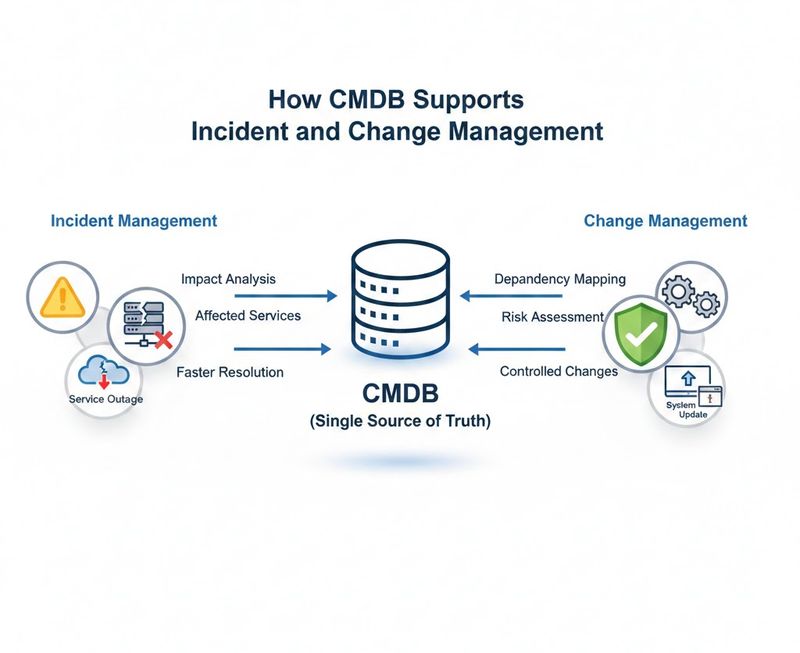
The CMDB plays a critical role in both Incident and Change Management. During an incident, the CMDB helps IT teams identify which CIs are affected and which business services rely on them. This visibility enables faster triaging, prioritization, and resolution, minimizing downtime and service disruption. Without a CMDB, IT teams often rely on incomplete or outdated information, leading to slower response times and repeated issues.
In Change Management, the CMDB is equally invaluable. By mapping relationships between CIs, IT teams can assess the potential impact of changes before implementation. For example, patching a server may affect multiple applications or services, and understanding these dependencies prevents unintended outages. ServiceNow allows teams to automate impact analysis, approvals, and risk assessments, ensuring changes are executed safely and efficiently.
Moreover, integration with the CMDB enables IT teams to implement proactive measures. By analyzing historical incidents and configuration data, organizations can identify trends, predict failures, and implement preventive actions. This proactive approach reduces recurring incidents, improves service reliability, and ensures that both Incident and Change Management processes are aligned with business priorities.
Risks of Running ITSM Without a CMDB
Running ITSM without a CMDB is like navigating without a map—operations become reactive, fragmented, and error-prone. Without a single source of truth for IT assets and their relationships, IT teams often struggle to understand the impact of incidents, changes, or service requests. This lack of visibility leads to delayed resolutions, mismanaged changes, and increased downtime.
Moreover, the absence of a CMDB can result in inconsistent data, duplicate efforts, and poor accountability. IT teams may make decisions based on incomplete or outdated information, leading to repeated problems and service failures. Critical dependencies may be overlooked, resulting in unintended outages that impact business operations and end-user satisfaction.
Finally, running ITSM without a CMDB hampers strategic planning and continuous improvement. Organizations cannot accurately assess risk, prioritize investments, or measure service performance. A robust CMDB provides the insights and structure necessary to manage IT proactively, reduce operational risk, and align IT services with business goals. Without it, ITSM remains reactive, inefficient, and unable to deliver true business value.
Conclusion
Building a strong ServiceNow ITSM foundation is not just about implementing a tool—it’s about adopting a structured, service-driven mindset across the organization. When ITSM processes are aligned with ITIL best practices and supported by ServiceNow’s powerful platform capabilities, IT teams gain clarity, consistency, and control over complex IT environments. This foundation enables organizations to move away from reactive firefighting and toward proactive, value-driven service delivery.
A successful ITSM foundation depends on several critical elements working together. Clearly defined roles ensure accountability, while well-designed processes bring structure and efficiency to daily operations. A secure platform architecture, strong role-based access, and well-managed users protect data and maintain compliance. Most importantly, a healthy CMDB provides the visibility needed to understand dependencies, assess impact, and make informed decisions across incident, problem, and change management.